How To Withdraw Your Earnings on KarryBiz


You set up your store, listed your products and managed orders so well, that sales are pouring in. You generated invoices and followed up on payments. Customers bought from you and money landed in your KarryBiz wallet. Well done, you have worked so hard.
Now comes the moment that makes all of that effort worthwhile: withdrawing your money.
Getting your earnings out of your KarryBiz wallet and into your bank account is the final step in the selling cycle and it should be the easiest. Because what is the point of making sales if you can’t access your revenue when you need it?
KarryBiz is built to make this process as smooth and straightforward as possible. Once your account is properly set up — KYC verified and bank account linked — withdrawing your earnings is a matter of a few taps.
But there are important things to know before you make your first withdrawal request. Requirements to meet. Steps to follow. Common mistakes to avoid.This guide covers everything, so your money gets from your KarryBiz wallet to your bank account without delays, errors, or surprises.
Before You Can Withdraw: The Two Non-Negotiable Requirements
KarryBiz has two mandatory requirements that must be completed before you can make any withdrawal. If either of these is missing, your withdrawal request will not go through.
Requirement 1: KYC Verification Must Be Complete
Your Know Your Customer (KYC) verification must be fully approved before withdrawals are enabled on your account.
KYC is KarryBiz’s identity verification process and it confirms you are who you say you are and that your account is legitimate. Without it, the platform cannot legally release funds to you.
To check your KYC status:
• Tap “More” from the bottom navigation bar.
• Tap “KYC Verification”.
• Your status should show “Verified” — not Pending or Rejected.
If your KYC is not yet complete, head to our guide: How to Complete KYC Verification on KarryBiz and finish the process before attempting a withdrawal.
Requirement 2: A Bank Account Must Be Linked
Your withdrawal destination — a verified Nigerian bank account — must be saved in your KarryBiz profile before you can request a payout. To check your linked bank accounts:
• Tap “More” from the bottom navigation bar.
• Tap “Bank Accounts”.
• At least one active bank account should be listed.
If no bank account is linked yet, head to our guide: How to Add and Manage Bank Accounts on KarryBiz and add your account first.

Understanding Your KarryBiz Wallet
Before making a withdrawal, it helps to understand how your KarryBiz wallet works.
Your KarryBiz wallet is the internal account where your store earnings are held. Every time a customer completes a payment through your store, the funds land in your wallet first before being transferred to your external bank account.
Think of it like a holding account or a safe for your revenue that you control and can access anytime.
Step-by-Step: How to Withdraw Your Earnings on KarryBiz
Step 1: Log In to Your KarryBiz Account
Open the KarryBiz app on your smartphone and log in using your registered email address and password.
Once logged in, you will land on your main dashboard.
Step 2: Navigate to Your Wallet
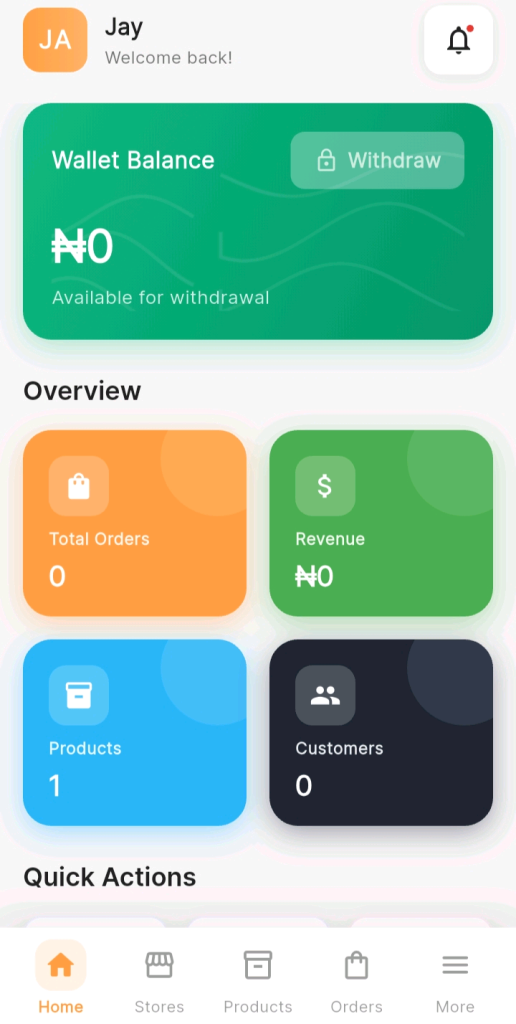
From your dashboard, locate and tap your Wallet or Balance section.This is typically displayed prominently on the home screen — showing your current available balance front and center.
Tap on it to open your full wallet page where you can see your complete balance breakdown and transaction history.
Step 3: Tap “Withdraw” or “Request Payout“
On your wallet page, look for and tap:
“Withdraw“, “Request Payout“, or “Transfer to Bank” or a similar withdrawal button.
This opens the withdrawal request form where you will specify how much you want to withdraw and where to send it.
Step 4: Select Your Destination Bank Account
On the withdrawal form, you will be prompted to select which bank account you want to receive the funds.
If you have multiple bank accounts saved on KarryBiz, they will all appear here as options. Tap the account you want to use for this withdrawal.
Step 5: Enter the Withdrawal Amount
Tap the amount field and enter how much you want to withdraw.
Step 6: Review the Withdrawal Summary.
Step 7: Confirm the Withdrawal
If everything looks correct on the summary screen, tap:
• “Confirm Withdrawal“.
• “Proceed”.
• “Submit Request”.
Step 8: Wait for the Transfer to Complete
After confirming your withdrawal, the transfer is processed and funds are sent to your bank account.
Step 9: Confirm Receipt in Your Bank Account
Once the transfer is processed, check your bank account to confirm the funds have arrived.
• Check your bank’s mobile app for a new credit alert.
• Check your SMS alerts for a bank credit notification.
• If using a fintech like OPay or Kuda, check your in-app transaction history.
Final Thoughts
Withdrawing your earnings is not just the end of the selling cycle but the reward for everything you have built.
Every store you set up. Every product you listed. Every order you fulfilled. Every invoice you generated. Every customer you served.
It all leads to this moment — the moment real money moves from your KarryBiz wallet into your bank account.
KarryBiz has built the infrastructure to make this moment as smooth, fast, and reliable as possible. Your job is to make sure your account is properly set up: KYC complete, bank account linked and to follow the withdrawal process correctly every time.
Do the work. Fulfill the orders. And collect your earnings with confidence.