How To Design Your Business Card on KarryBiz


Every serious business owner needs a business card. It is one of the oldest and most effective networking tools in the world.
When you meet a potential customer, a supplier, a partner, or an investor — a business card puts your name, your contact details, and your brand directly in their hands. It says: “I am a professional. Here is exactly how to reach me.”
But traditional business cards have a problem. You run out of them. They get lost. They fade. They go out of date every time your phone number or email changes. And printing new ones costs money and time. That is why digital business cards are rapidly replacing physical ones — especially for modern entrepreneurs and online sellers across Africa.
A digital business card lives on your phone, never runs out, never fades, and can be shared instantly via WhatsApp, email, or a link — with anyone, anywhere in the world.
And KarryBiz has built a completely free Business Card designer right inside the app.
In just a few minutes, you can create a clean, branded, professional digital business card — choose your design style, pick your brand color, fill in your contact details, preview it in real time, and share it instantly with the world. No designer. No printing cost. No hassle.
In this guide, we will walk you through every step of designing your business card on KarryBiz — exactly as it appears in the app.

Step-by-step Process Of Designing Your Business Card
Step 1: Log In and Navigate to Business Card
• Open the KarryBiz app and log in to your account.
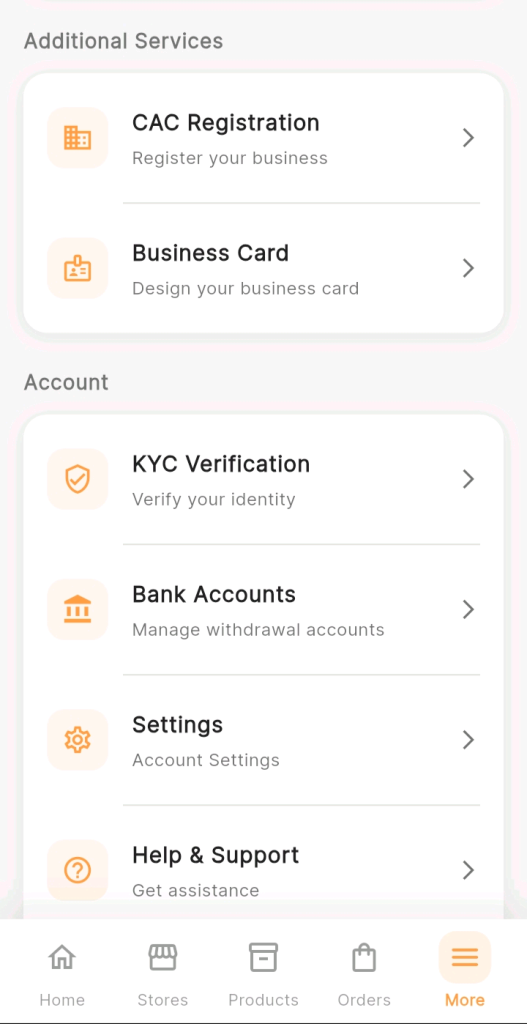
• Tap “More” from the bottom navigation bar, scroll to “Additional Services,” and tap “Business Card.”
The Business Card designer will open, ready for you to fill in your details.
Step 2: Fill In Your Contact Information
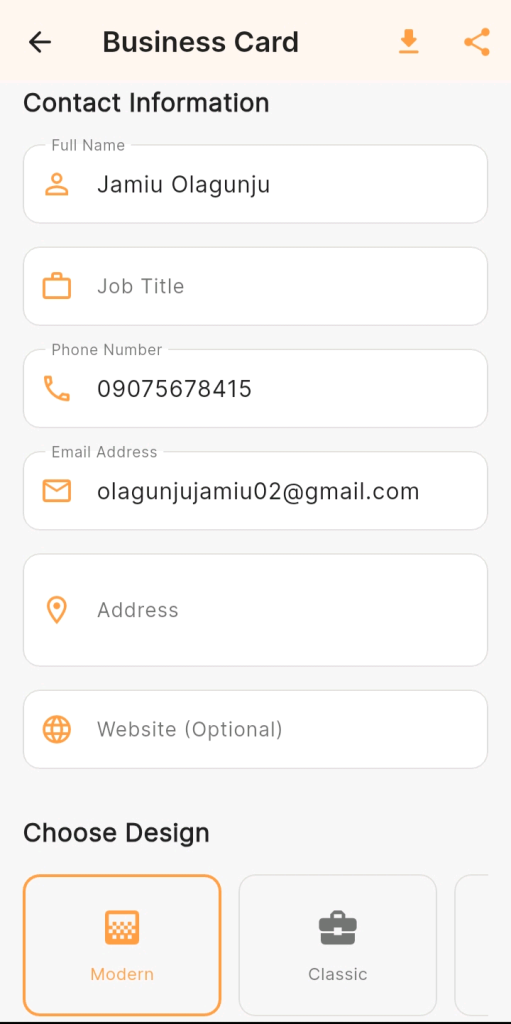
The first section of the Business Card page is Contact Information — six fields that populate your card with your professional details.
Full Name: Your complete name as you want it to appear on your business card.
Job Title: Your role, position, or professional title. This field tells people what you do at a glance — it is one of the most powerful lines on any business card.
Phone Number: Your primary business contact number — the one you check regularly and can respond to promptly.
Email Address: Your professional business email address.
Address: Your business address or general location. If you operate from home or prefer not to share a full address, entering your city and state is perfectly acceptable.
Website (Optional): If you have a website or custom domain for your KarryBiz store, enter it here.
Step 3: Choose Your Card Design
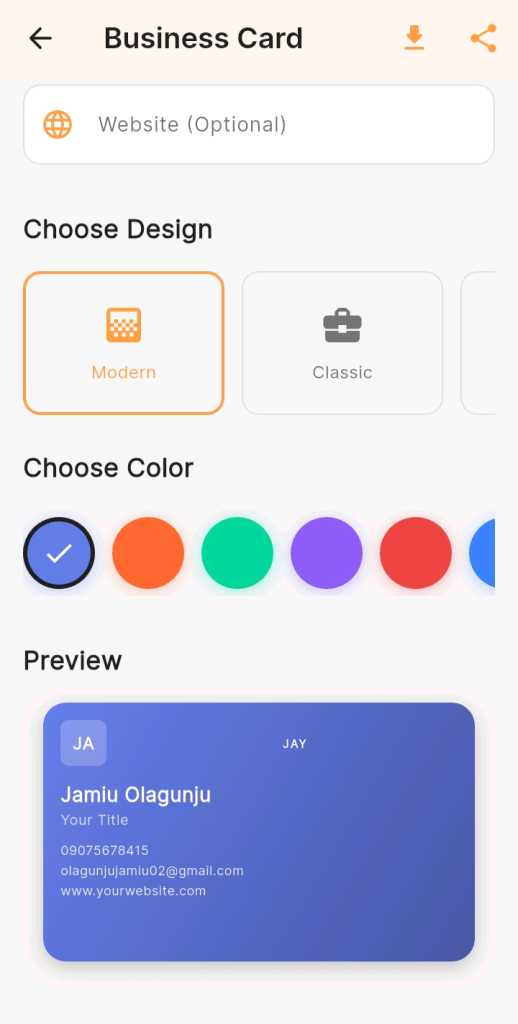
Scroll down to the “Choose Design” section.
KarryBiz currently offers multiple card design styles. Modern (Default Selection), Classic and minimal.
Step 4: Choose Your Card Color
Below the design selector, you will find the “Choose Color” section — a horizontal row of colored circles you can tap to change your card’s color theme.
Step 5: Review Your Live Preview
As you fill in your details and make design choices, the “Preview” section at the bottom of the page updates in real time — showing you exactly what your finished business card will look like.
Step 6: Download Your Business Card
Once you are satisfied with your card, tap the download icon in the top right corner of the Business Card page.
KarryBiz will save your business card as an image to your phone’s gallery.
Step 7: Share Your Business Card
Tap the share icon in the top right corner to share your business card directly from the app.
KarryBiz will open your phone’s native share menu, allowing you to send your card via:
• WhatsApp — Share directly to individual contacts or groups.
• Email — Attach and send to professional contacts.
• Telegram — Share to channels or contacts.
• Instagram DM — Send to followers or prospects.
• Any other app on your phone that accepts image sharing.
Final Thoughts
A business card is more than a piece of paper or in this case, more than a digital image. It is your professional introduction. It is the first tangible thing a contact receives from you. It is your brand, distilled into a single, shareable card.
KarryBiz has made it completely free and incredibly simple to create one. You have no excuse not to have a professional business card representing your brand.
Open the app. Fill in your details. Choose your design. Pick your color and match to your brand. Download it. Then share it with the next person who asks — “So, what do you do?”