How To Enable SMS Notifications For Order Updates On KarryBiz

Here is a scene that plays out in Nigerian online business space almost every single day.
A customer places an order, payment only to go silence.
No confirmation, nor update. No message telling them their order was received, that it is being prepared, that it is on the way. Just silence and an anxious wait.
So what does that customer do?They message the seller.
Customer, “Hello, I made payment. Has it been received?”
Seller, “Good afternoon, just checking — when is my order coming?”
Two days later, Customer, “Please when will it be dispatched? It has been two days.”
Now multiply that by every customer who places an order with you. That is a constant stream of follow-up messages that you need to respond to — manually, individually, repeatedly — taking time away from actually running your business.
Now imagine a different scenario. The same customer places an order and makes payment. Within minutes, they receive an SMS directly to their phone: “Your order has been confirmed. We are preparing it for dispatch.”
A few hours later, another SMS: “Your order is on its way! Expected delivery: tomorrow.”
And when it arrives, a final message confirming delivery. No anxiety. No chasing. No manual follow-up from you.
That is what KarryBiz’s SMS Notifications feature does — and it is available right now, ready to enable with a single tap.
In this guide, we will walk you through exactly how to enable SMS notifications on KarryBiz, what they do for your customers and your business, and how to get the most from this feature as part of a professional order management system.
What Are SMS Notifications on KarryBiz?
SMS Notifications is a feature that automatically sends text message updates to your customers at key stages of their order journey — without you having to manually send a single message.
When enabled on your KarryBiz store, the system triggers SMS alerts to customers when their order status changes — keeping them informed throughout the fulfilment process automatically.
Why SMS Notifications Are Worth Every Naira
Let us do the math honestly before we talk about anything else.
Say you process 50 orders per month. Each order triggers an average of 3 SMS notifications (confirmation, dispatch, delivery). That is 150 SMS messages per month at ₦20 each — a total of ₦3,000 per month. Now ask yourself: what does ₦3,000 buy you in terms of the time you had spend manually sending updates to all 50 customers? At minimum wage for messaging time alone, you are well beyond that figure. And that is before you factor in the business value of what SMS notifications actually deliver.
• Dramatically Fewer Customer Enquiries.
• Reduced Order Disputes.
• Professional Customer Experience.
• You Reclaim Your Time.
• Your Business Looks Bigger Than It Is.
How To Enable SMS Notifications On KarryBiz
The process is simple and takes less than 60 seconds.
Step 1: Log In to Your KarryBiz Account
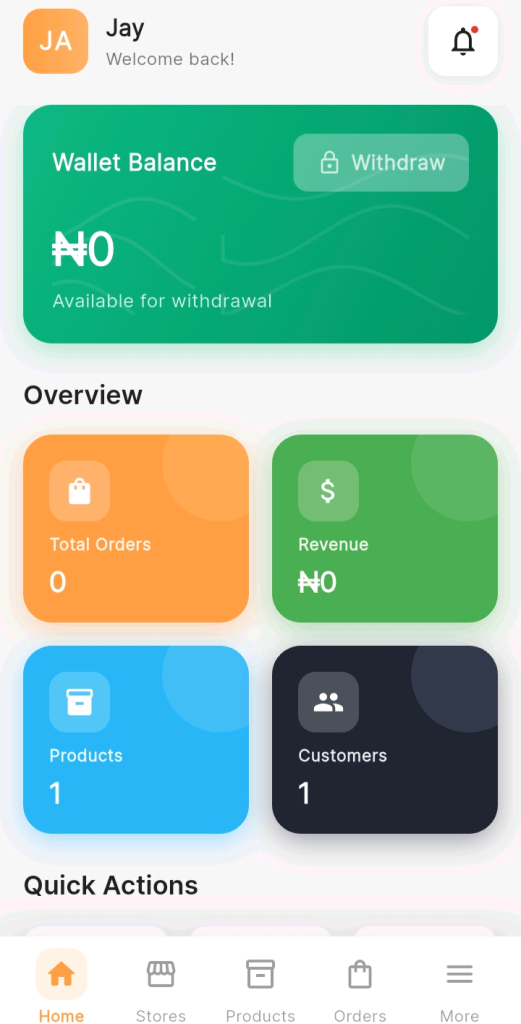
Open the KarryBiz app on your smartphone and log in.
You will land on the Home dashboard — showing your wallet balance, overview metrics (Total Orders, Revenue, Products, Customers), and Quick Actions at the bottom.
Step 2: Navigate to Your Stores Page
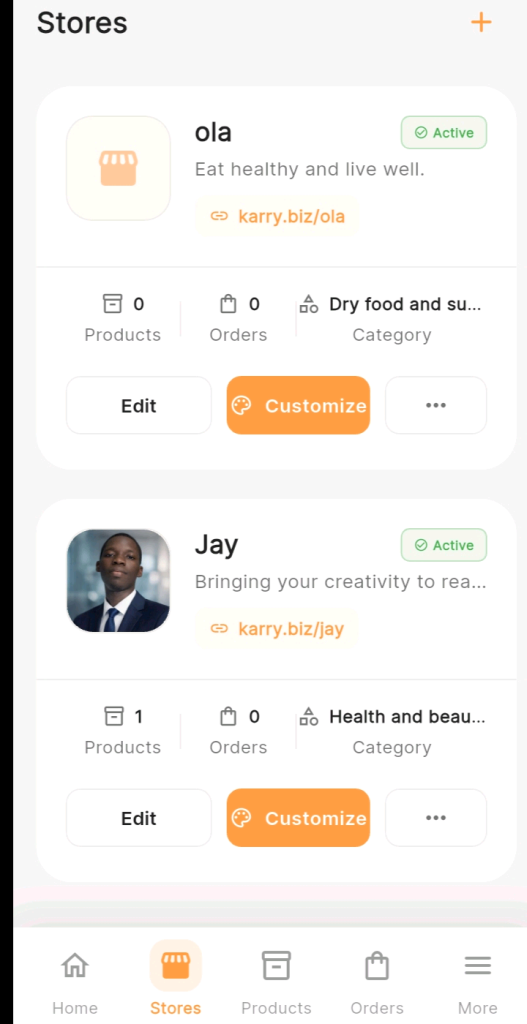
From the bottom navigation bar, tap “Stores.”
This opens the Stores page — showing all your active stores as cards.
Step 3: Tap the (three horizontal dots) ⋯ Button on the Store You Want to Configure
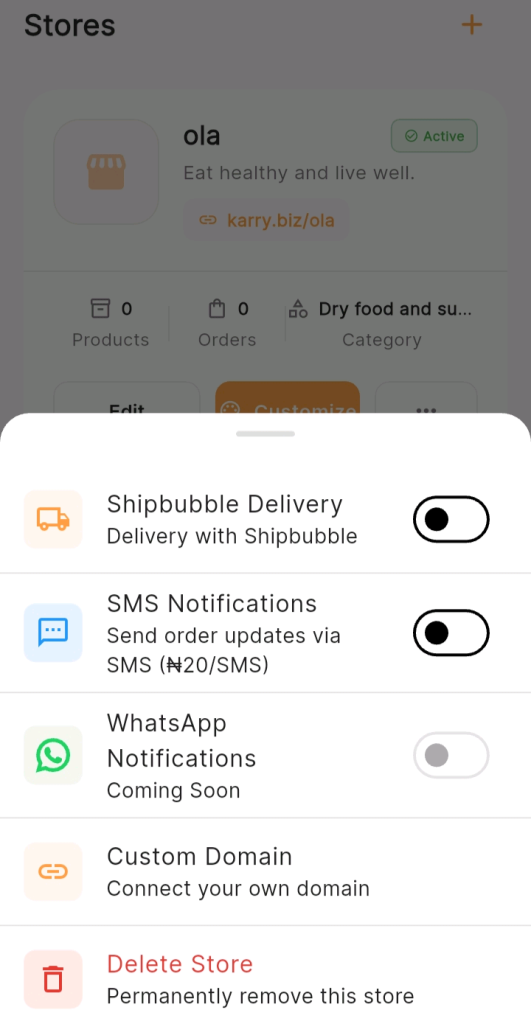
Find the store you want to enable SMS notifications for and tap the ⋯ (three dots) button at the bottom right of its card.
Step 4: Enable the Toggle
If the SMS Notifications toggle is currently OFF (grey, with the dot on the left) — tap it to switch it ON ( with the dot on the right).
The toggle switches immediately upon tapping. No additional confirmation screen is required.
Step 5: Enable SMS Notifications for Each Store Separately
If you manage multiple stores on KarryBiz — as shown in the screenshots with both “ola” and “Jay” — you need to enable SMS notifications for each store individually.
Final Thoughts
The ₦20 you spend on an SMS notification to a customer is one of the highest-return investments your KarryBiz business can make.
It buys you a customer who feels informed and respected throughout their order journey. It buys you fewer anxious messages in your inbox. It buys you a professional reputation that most Nigerian online sellers simply don’t have. And it buys you time — the time you would have spent manually sending those updates — to focus on growing your business instead.
It is a single tap to enable. And once it is on, it works for you silently: every order, every update, every customer — without you having to do a thing.
Open your KarryBiz app right now. Tap Stores. Tap the ⋯(3 dots) on your store. Find SMS Notifications. Switch it on.
Your customers will notice. And they will thank you for it — with their loyalty.