How To Complete KYC Verification On KarryBiz

You have set up your store, added products and probably made a sales or two.
But there is one thing standing between you and the full power of KarryBiz and that is your KYC verification.
If you have ever tried to withdraw your earnings, access certain features, or scale your operations on KarryBiz and hit a wall — KYC is almost certainly the reason. And the good news is that it is one of the simplest things you can do to unlock everything the platform has to offer.
KYC stands for Know Your Customer — and in this case, it is KarryBiz’s way of verifying that you are who you say you are. It is a standard compliance process used by virtually every serious financial and e-commerce platform in the world — from banks to fintech apps to online marketplaces. Completing it is not just a formality, but a milestone that transforms your KarryBiz account from a basic store into a fully functional, trusted, and compliant business operation.
In this guide, we will walk you through exactly what KYC verification is, why it matters, what documents you will need, and how to complete the process on KarryBiz step by step — so you can get verified quickly and get back to growing your business.
What Is KYC Verification?
KYC (Know Your Customer) is an identity verification process that platforms use to confirm the real identity of their users. It involves submitting personal identification documents that prove:
• Who you are: Your legal name and date of birth.
• Where you live: Your residential address.
• That you are a real person and not a bot, a fake account, or a fraudulent actor.
KYC is a global standard required by financial regulators in virtually every country — including Nigeria, where the Central Bank of Nigeria (CBN) mandates KYC compliance for any platform handling financial transactions.
For KarryBiz a platform that processes payments, manages withdrawals, and handles business finances; KYC verification is not optional. It is a legal and operational necessity.
Why KYC Verification Matters for Your KarryBiz Store
Completing your KYC verification isn’t just about ticking a box. Here is what it actually does for your business:
• It Unlocks Full Platform Features:
Many of KarryBiz’s most powerful features including withdrawals, higher transaction limits, and advanced business tools — are only available to verified accounts. An unverified account is a limited account.
• It Enables You to Withdraw Your Earnings:
Without completing KYC verification, you may not be able to withdraw money from your KarryBiz wallet to your bank account. Verifying your identity is what gives the platform the confidence to release funds to you.
• It Protects Your Account:
A verified account is a secure account. KYC adds a layer of identity protection that makes it significantly harder for fraudsters to take over or impersonate your business account.
• It Builds Trust With Customers:
Some platforms display a verification badge on verified stores — signaling to customers that this is a legitimate, verified business. That trust signal can directly impact your conversion rate.
• It Keeps Your Business Legally Compliant:
Operating a verified business account keeps you on the right side of Nigerian financial regulations and protecting you from potential account suspension or legal complications down the line.
• It Positions You for Growth:
As your business grows and transaction volumes increase, having a verified account means you won’t hit sudden limitations at critical moments. Verification now means smoother scaling later.
What Documents Will You Need?
Before starting the KYC process on KarryBiz, gather the following documents. Having them ready before you begin makes the process faster and smoother.
Personal Identity Documents (One of the following):
•NIN(National Identity Number) issued by NIMC.
• International Passport issued by Nigerian Immigration Service.
• Driving License issued by FRSC.
• Voters’ Card(PVC) issued by INEC.
Proof of Address (One of the following):
• Utility bills: Electricity, water, or waste bill — usually not older than 3 months.
• Bank Statement: Must show your name and residential address.
• Tenancy agreement: Must be signed and stamped.
• Government-issued Documents: Any official document showing your name and address.
Additional Requirements: such as BVN (Bank Verification Number) or selfie are usually required.
Step-by-Step: How to Complete KYC Verification on KarryBiz
Step 1: Log In and Navigate to KYC Verification
• Open the KarryBiz app on your smartphone and log in to your account.
• From the bottom navigation bar, tap “More.”
• Scroll to the “Account” section and tap “KYC Verification.”
Step 2: Select Your ID Type
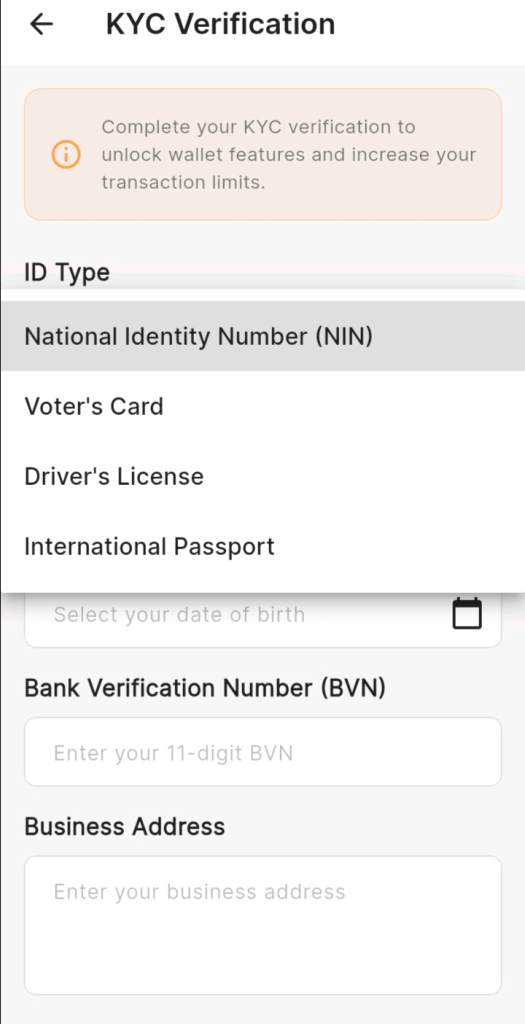
The first field on the KYC form is ID Type — a dropdown menu where you select which government-issued identification you will be using for verification.
Step 3: Enter Your ID Number
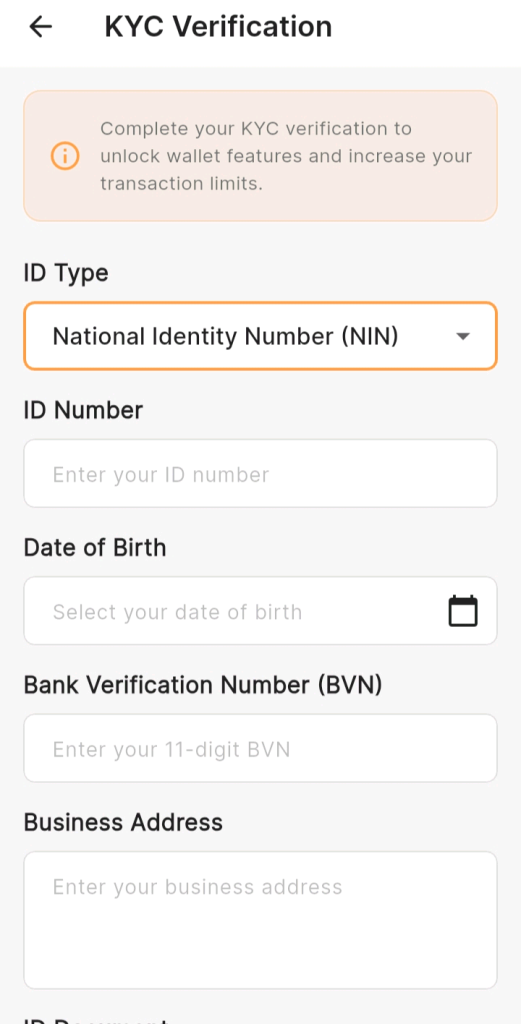
Once you have selected your ID type, tap the “ID Number” field and enter the unique number from your chosen document.
Step 4: Select Your Date of Birth
Tap the “Date of Birth” field. A calendar picker will appear — use it to select your exact date of birth.
Step 5: Enter Your Bank Verification Number (BVN)
Tap the “Bank Verification Number (BVN)” field and enter your 11-digit BVN.
Your BVN is a unique identifier issued to every Nigerian bank account holder by the Central Bank of Nigeria. It is linked to your biometric data and is used to confirm your identity across all Nigerian banks and financial platforms.
Step 6: Enter Your Business Address
• Tap the “Business Address” field and enter your current business address.
• If you operate a home-based business, you can enter your residential address here instead.
Tips for entering your business address:
• Be as specific as possible — include street name, house or plot number, and area.
• Match the address to the proof of address document you will be uploading in the next step.
• If you operate across multiple locations, use your primary business address.
Step 7: Upload Your ID Document
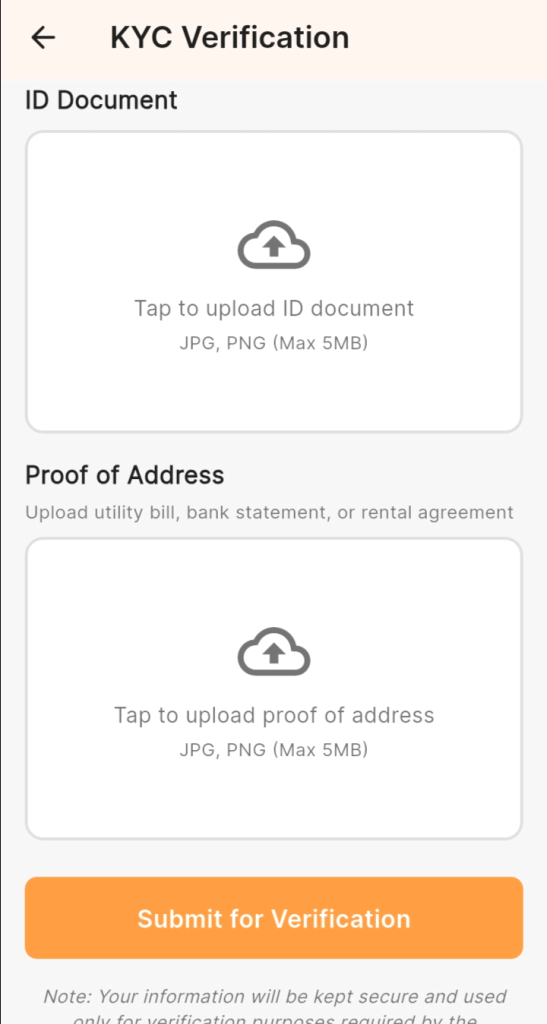
• Scroll down to the “ID Document” section.
• You will see an upload box with the instruction: “Tap to upload ID document — JPG, PNG (Max 5MB)”.
• Tap the upload box, then select your ID document photo from your phone gallery.
Step 8: Upload Your Proof of Address
Below the ID Document upload, you will find the “Proof of Address” section with the instruction: “Upload utility bill, bank statement, or rental agreement — JPG, PNG”.
Tap the upload box and select your proof of address document from your phone gallery.
Step 9: Review Everything Before Submitting
Before tapping the submit button, take a moment to review every field you have filled in.
Step 10: Tap “Submit for Verification”
• Once you are satisfied that everything is accurate and complete, tap the large orange “Submit for Verification” button at the bottom of the page.
• Your KYC application is now submitted.
• You will receive a confirmation that your submission is under review. KarryBiz will process your application and notify you of the outcome via in-app notification, email, or SMS.
Final Thoughts
KYC verification is one of the most important things you will do on KarryBiz — and one of the quickest. With your documents ready, the entire process takes less than 10 minutes.
Once it is done, your wallet is unlocked, your transaction limits are lifted, and your account operates at full capacity. There is no faster way to level up your KarryBiz experience.
Gather your NIN, BVN, and proof of address right now. Open the app. Submit your KYC.
Everything you need to run a serious, successful online business on KarryBiz is waiting on the other side