How To Set Up Your Store’s Contact Information on KarryBiz

When customers visit your online store, one of the first things they look for—after your products—is how to reach you. Whether they have questions, want to confirm an order, or need support, your contact information plays a key role in building trust and closing sales.
For many African entrepreneurs, especially those selling through WhatsApp and social media, communication is everything. If customers can’t easily contact you, they may leave your store and buy from someone else.
That is why setting up your store contact information on KarryBiz is not just a basic step—it is essential for running a successful and credible online business.
In this guide, you will learn how to properly set up your store’s contact details on KarryBiz so customers can reach you easily and confidently.
Why Contact Information Is Critical for Your Online Store
Before we get into the steps, let us understand what is really at stake here.
• It Builds Buyer Confidence:
Studies consistently show that customers are significantly more likely to complete a purchase when they can clearly see how to contact the seller. It removes the fear of being stranded if something goes wrong.
• It Reduces Cart Abandonment:
One of the top reasons shoppers abandon their carts is uncertainty. “Can I trust this store?” Visible contact information answers that question immediately.
• It Humanizes Your Business:
Behind every great online store is a real person. Contact information reminds customers of that. It transforms your store from a faceless website into a real business with a real owner.
• It Handles Objections Before They Arise:
Customers often have questions before they buy — about sizing, delivery timelines, customization options, bulk orders, and more. Easy access to contact details means those questions get answered and sales get closed.
• It Protects Your Reputation:
When customers can reach you easily, small issues get resolved privately before they become public complaints, as public complaints might affect your public image. Accessibility is good for business.

What You Will Need Before You Start
Before updating your contact information on KarryBiz, have the following ready:
• Your business WhatsApp number (preferably separate from your personal number).
• A professional email address — e.g. [email protected] or [email protected].
• Your business location — city and state is enough if you prefer not to share a full address.
• Your social media handles for any platforms you are active on.
• An active KarryBiz store already created.
Pro tip: If you don’t have a business email yet, create one for free on Gmail. Something like [email protected] is far more professional than using a personal email like Ademola [email protected]. Or if you own a custom domain with hosting company like Harmonweb, namecheap or bluehost, you can reach out for a professional domain like [email protected].
Step-by-step Process Of Adding Your Contact To Your Store
Step 1: Log in to Your KarryBiz Dashboard
To begin:
• Visit the KarryBiz store on your phone.
• Log in to your account.
• Access your dashboard.Your dashboard is where you manage all your store settings.
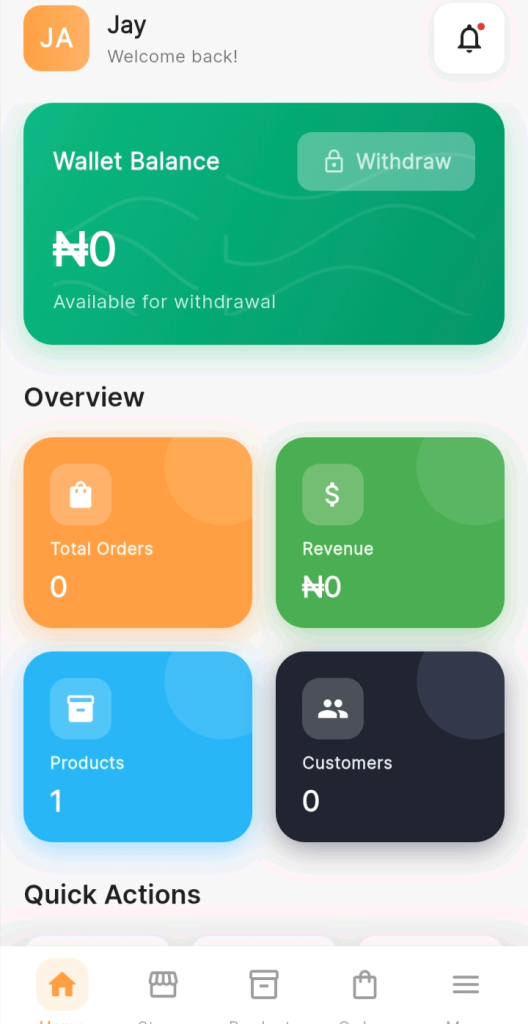
Step 2: Click on the name icon representing your shop name
• In this example mine is JA (where it stated Jay WELCOME BACK!)
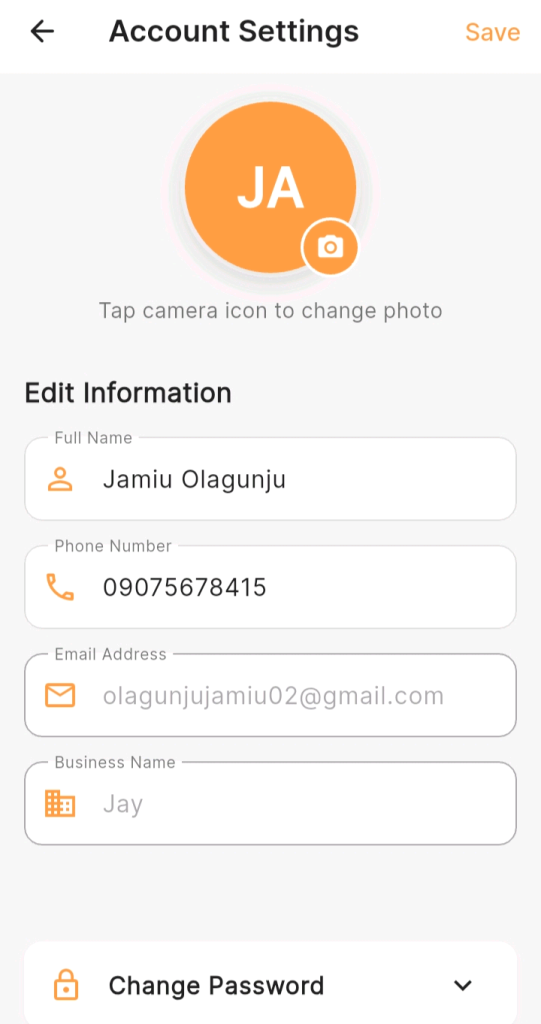
• Edit phone number (Preferably use a WhatsApp number).
• Edit and enter your email address.
Step 3: Add Your Phone Number
Your phone number is one of the most important contact details, especially in Nigeria where customers often prefer direct communication.
To add your phone number:
• Enter your active phone number.
• Ensure it is correct and reachable.
• Include your country code if required.
Tip: Use a number that is always available for business inquiries.
Step 4: Add Your Email Address
An email address gives your store a more professional appearance and provides another way for customers to reach you.
To set it up:
• Enter your business email address.
• Use a clear and professional format (e.g. [email protected]).
• Make sure you check this email regularly so you don’t miss customer inquiries.
• Click on ‘Save’.
Additional Settings:
Step 5: Navigate to Store Settings
Once you are logged in:
• Go to the Stores section.
• Select your store.
• Click on Store Settings.
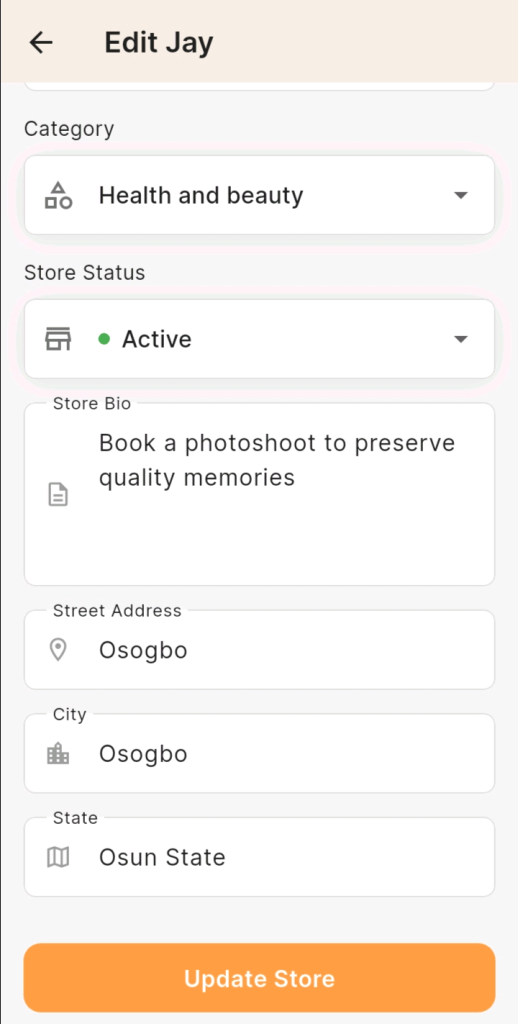
• Look for a section labeled Street Address, City, and state.
• Enter the appropriate information and click on “update store”.
Step 6: Save and Preview
After entering your contact details:
• Click Save Changes.
• Preview your store by sending to friends or open the store link in your incognito mode on your browser.
• Check to ensure all contact information is displayed correctly and is easy to find.
Final Thoughts
Setting up your store’s contact information on KarryBiz is a simple step that has a powerful impact on your business. It helps build trust, improve communication, and increase your chances of making sales.
By providing clear and accessible contact details, you make it easier for customers to connect with your brand and feel confident doing business with you.
Take a few minutes to set up your contact information properly—it is one of the easiest ways to make your store more professional and customer-friendly.