How To Add Tax To Invoices On KarryBiz

Tax on invoices is one of those topics that makes a lot of Nigerian business owners uncomfortable — not because they are doing anything wrong, but because most of them were never properly taught what tax compliance actually means for their specific business size and stage.
So before we walk through the technical steps of adding tax to an invoice on KarryBiz, let us have an honest conversation about whether you even need to and when.
Because here is the truth: not every KarryBiz seller is legally required to charge VAT on their invoices; but some are. And the distinction matters — both for staying compliant with Nigerian tax law and for making sure you are not either overcharging customers who shouldn’t be taxed or undercharging in ways that create problems later.
Once we have cleared that up, the actual mechanics of adding tax in KarryBiz is straightforward — there is a dedicated Tax field right in the Create Invoice form, and it works exactly as you had expect.
What Is VAT and When Does It Apply to Your KarryBiz Business?
VAT (Value Added Tax) is a consumption tax applied to goods and services at each stage of production and distribution. In Nigeria, it is governed by the Value Added Tax Act and administered by the Federal Inland Revenue Service (FIRS).
The current Nigerian VAT rate is 7.5% — introduced via the Finance Act 2020, up from the previous rate of 5%.
When Are You Required to Charge VAT?
This is where most small business owners get confused. The simple answer:
You are required to register for VAT and charge it on your invoices if your annual taxable turnover exceeds ₦50 million.
If your business generates less than ₦50 million per year in revenue — you are not legally required to register for VAT or charge it on your invoices under the current threshold exemption for small businesses in Nigeria.
When You Might Add Tax Even If Not Required By Law
Even if you are below the VAT threshold, there are situations where adding tax to an invoice makes business sense:
• Corporate clients who expect it:
Large companies and government entities often require VAT-inclusive invoices for their own accounting and procurement processes. Even if you are not VAT-registered, some corporate clients will ask for a tax line — in which case you should clarify your registration status and handle accordingly.
• Building good financial habits:
Some sellers who are approaching the ₦50 million threshold add tax to their invoices proactively — preparing their systems for when compliance becomes mandatory.
• Professional presentation:
For certain B2B transactions, a detailed invoice with clearly itemized tax shows financial sophistication and attention to detail.
What The KarryBiz Invoice Tax Field Does
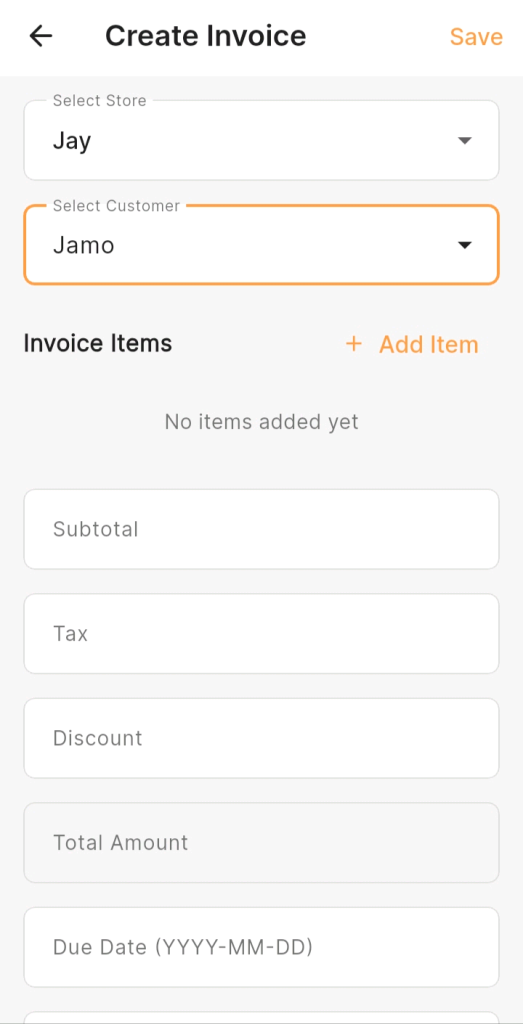
Looking at the Create Invoice form in the KarryBiz app — visible in the screenshots — the form includes the following fields in order:
• Select Store.
• Select Customer.
• Invoice Items.
• Subtotal.
• Tax (manual entry).
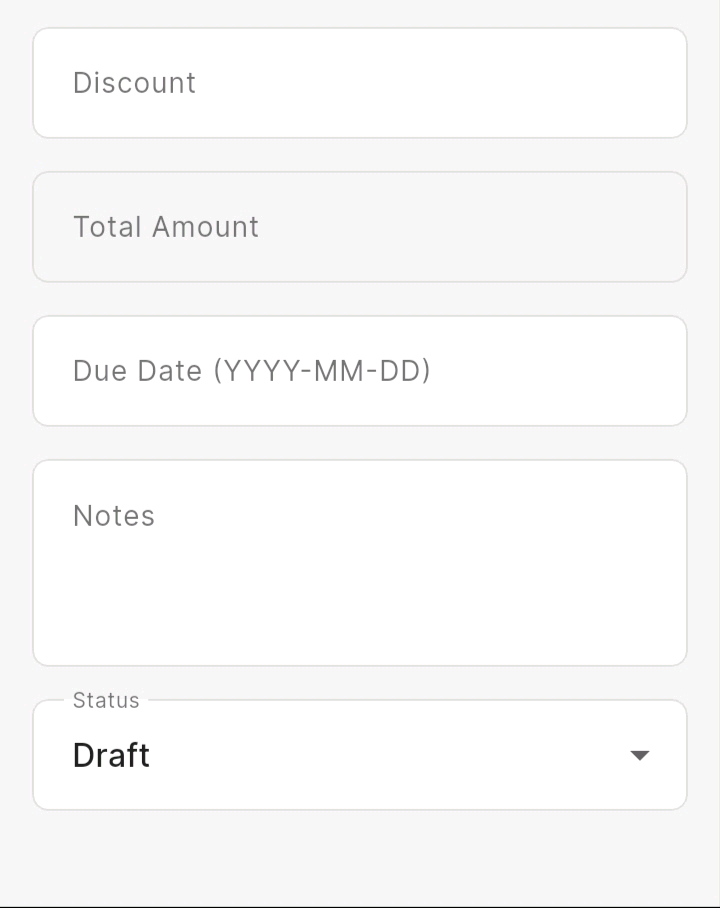
• Discount (manual entry).
• Total Amount (auto-calculated).
• Due Date (YYYY-MM-DD format).
• Notes (input text field)
• Status (dropdown — showing “Draft” by default).
Final Thoughts
Tax on invoices doesn’t have to be complicated. For most KarryBiz sellers at the early stage of business, it is simply a field that stays at zero — because you are below the threshold where VAT becomes a legal obligation.
But as your business grows — as your revenue climbs toward and past the ₦50 million mark — understanding and correctly applying tax on your invoices becomes a genuine compliance responsibility. And by the time you are at that level, you want the habit of clean, professional invoicing already deeply embedded in how you operate.
KarryBiz gives you the Tax field. Use it correctly — whether that means entering zero because you are not VAT-registered, entering the right amount because you are, or entering a negotiated tax figure for a specific corporate transaction. Either way, fill it in deliberately. Not by accident, neither by guesswork.
Because professional invoicing is professional business, and professional business gets you paid.