How To Add And Manage Bank Accounts on KarryBiz

You can set up your store, made sales. Invoices can be sent out and payments are coming in. Here comes the moment every seller works towards and that is getting paid.
But before KarryBiz can send a single naira to your bank account, you need to do one important thing: add your bank account details to the platform. This is not just a technical step — it is the financial bridge between your KarryBiz wallet and your real-world bank account. Without it, your earnings sit in your wallet with nowhere to go. With it, you can withdraw your money whenever you need it — directly into your Nigerian bank account, whether that is GTBank, Access Bank, OPay, Kuda, or any other supported bank. The process is simple, fast, and takes less than two minutes.
And in this guide, we will walk you through every step — exactly as it appears in the KarryBiz app — so you can get your account set up correctly and start withdrawing your earnings without delay.

Why Adding Your Bank Account Is Essential
Before we get into the steps, here is why this matters for your business:
• It Enables Withdrawals:
This is the most obvious reason. Without a linked bank account, you cannot withdraw your earnings from KarryBiz. Your wallet balance will be inaccessible until your bank details are added and verified.
• It Keeps Your Business Finances Separate:
Linking a dedicated business bank account rather than a personal account — keeps your business income separate from your personal finances. This is a fundamental principle of good financial management and makes accounting, budgeting, and tax preparation significantly easier.
• It Speeds Up Payment Processing:
With your bank details already saved in KarryBiz, every withdrawal request is processed faster. You don’t have to re-enter your details each time, as they are already saved and ready.
• It Adds a Layer of Security:
Having your verified bank account linked to your KarryBiz profile adds an extra layer of security. It ensures that your earnings can only be sent to an account that has been verified as yours — protecting you against unauthorized withdrawals.
• It Builds A Complete Business Profile:
A fully set-up KarryBiz account — with KYC completed and bank account linked — signals to the platform that you are a serious, and an active seller. This can influence your access to advanced features and higher transaction limits over time.
Step-by-Step: How To Add a Bank Account on KarryBiz
Step 1: Log In to Your KarryBiz Account
Open the KarryBiz app on your smartphone and log in using your email address and password.
Once logged in, you will land on your main dashboard.
Step 2: Navigate to Bank Accounts
• From the bottom navigation bar, tap “More.”
• This opens the extended menu. Scroll to the “Account” section and tap “Bank Accounts.”
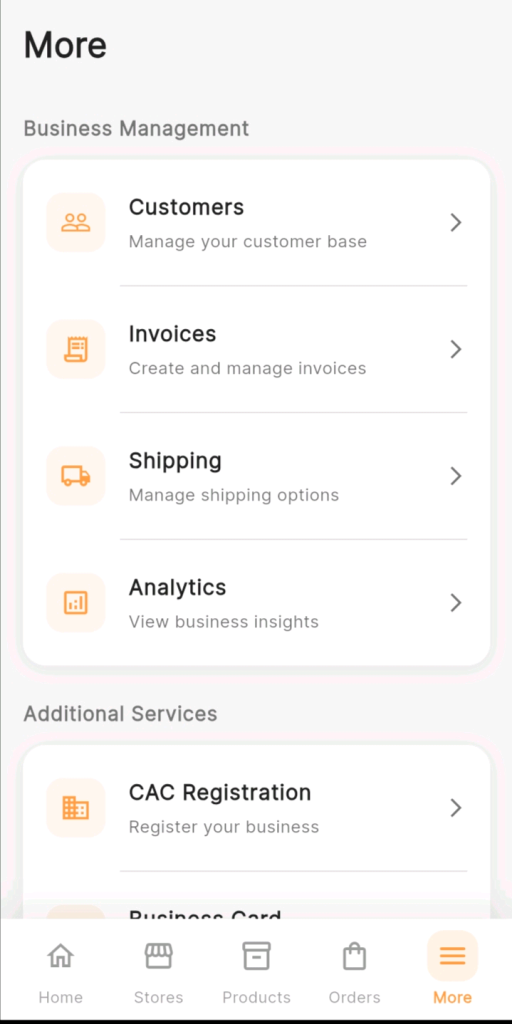
The Bank Accounts page will open, displaying any bank accounts you have previously added. If this is your first time, the page may show an empty list or prompt you to add your first account.
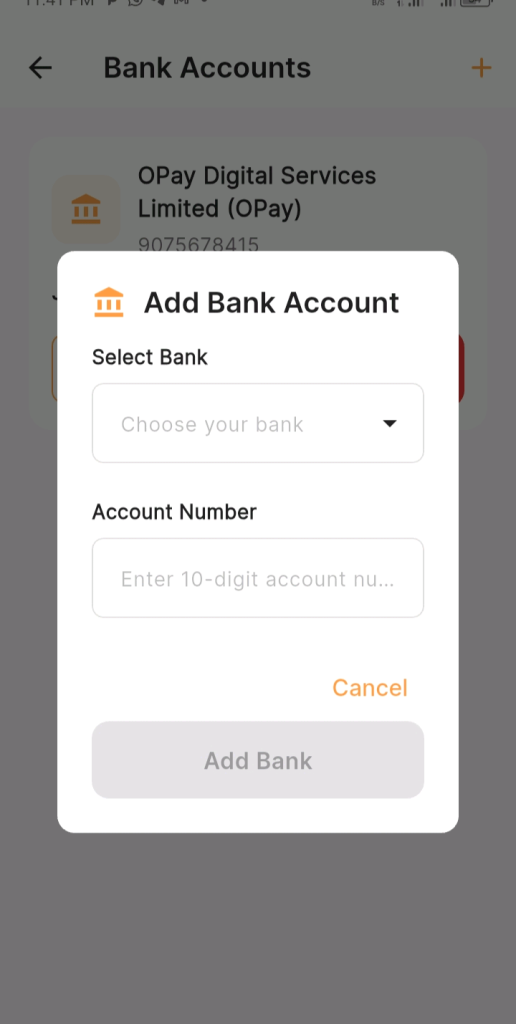
Step 3: Tap the “+” Button to Add a New Account
• In the top right corner of the Bank Accounts page, tap the orange “+” icon.
This opens the “Add Bank Account” modal — a pop-up form with two fields:
• Select Bank: A dropdown to choose your bank.
• Account Number: A field to enter your 10-digit account number.
Step 4: Select Your Bank
• Tap the “Choose your bank” dropdown under the Select Bank label.
• A list of Nigerian banks and financial institutions will appear. Scroll through the list and tap your bank name to select it.
Step 5: Enter Your Account Number
Tap the “Account Number” field and enter your 10-digit Nigerian bank account number.
Step 6: Tap “Add Bank” to Save
Once your bank is selected and your account number is verified, the “Add Bank” button at the bottom of the modal will become active.
• Tap “Add Bank” to save your bank account to your KarryBiz profile.
• Your bank account is now linked and ready for withdrawals. It will appear on your Bank Accounts page with the bank name and account number displayed — just like the OPay account shown in the app screenshot.
How To Add Multiple Bank Accounts
KarryBiz allows you to save more than one bank account. This is useful if you operate multiple accounts or want the flexibility to withdraw to different banks.To add an additional bank account:
• Go back to the Bank Accounts page.
• Tap the “+” icon in the top right corner again.
• Repeat Steps 4 through 6 for each additional account.
Pro tip: Add both a traditional bank account and a fintech account (like OPay or Kuda) for maximum flexibility. Fintech accounts often process withdrawals faster, while traditional bank accounts may be preferred for larger amounts.
Conclusion
Adding your bank account to KarryBiz is one of the simplest yet most important steps in setting up your seller profile. It takes less than two minutes but without it, none of your hard-earned sales revenue can reach you.
Think of it as opening the final door between your store’s earnings and your wallet. Everything else including your store setup, products, orders, and invoices — all of that work leads to this moment. The moment you can actually withdraw your money and reinvest it in growing your business