How To View A Customer’s Purchase History On KarryBiz

Every customer who buys from your store tells you something. Usually not just through the words they type in a WhatsApp message or the reviews they leave, but through their purchasing behaviour.
What they buy. How often they buy it. How much they spend. What they order together. When they go quiet. All these information sitting right inside your KarryBiz customer profiles — is some of the most valuable business intelligence you have access to. And most sellers never look at it.
They add a customer to their database, generate an invoice, ship the order, and move on. The customer’s profile sits untouched until the next order comes in — if it ever does.
The sellers who grow fastest are the ones who do things differently. They check their customer profiles regularly. They know which customers are buying frequently and which ones have gone cold. They use purchase history to send the right message to the right person at the right time. They make customers feel remembered, because they actually remember them.
KarryBiz gives you the tools to do exactly that through the customer purchase history feature — a complete record of every order, invoice, and transaction linked to each customer profile in your database.
In this guide, we will walk you through exactly how to view a customer’s purchase history on KarryBiz and more importantly, how to use that information to build stronger customer relationships and drive more sales.
What Is Customer Purchase History And Why It Is Important?
A customer’s purchase history is a chronological record of every transaction they have completed with your store. On KarryBiz, this typically includes:
• Order date: When each purchase was made.
• Order number: Unique identifier for each transaction.
• Products Ordered: What was bought in each order.
• Quantity: How many units of each product.
• Order Value: How much was spent per order.
• Payment Status: Whether the order was paid, pending, or refunded.
• Order Status: Whether the order was fulfilled, cancelled, or in progress.
• Invoices: Invoices generated and linked to this customer.
• Total spend: Cumulative amount spent with your store.
Why Viewing Purchase History Matters for Your Business
• It Helps You Identify Your Best Customers:
Not all customers are equal. Some buy once and never return. Others become regulars who account for a disproportionate share of your revenue. Purchase history lets you identify who your VIP customers are — so you can treat them accordingly.
• It Enables Personalized Communication:
When you know what a customer has bought before, you can reach out with relevant offers — not generic promotions.
Example: “Hey Anike, we just got new arrivals in the Ankara print you loved from your last order” lands very differently than “Hi, check out our new products.”
• It Helps You Forecast Inventory:
Customers who order the same product every month are telling you something important about demand. Purchase history reveals these patterns so you can stock smarter and avoid running out of popular items.
• It Supports Dispute Resolution:
If a customer ever questions an order: what was delivered, how much they paid, or when it arrived — their purchase history is your official record. It resolves disputes quickly and professionally.
• It Reveals Churned Customers:
A customer who ordered every two weeks and then suddenly stopped is worth noticing. Purchase history shows you exactly who has gone quiet and when, so you can reach out with a re-engagement message before they are lost entirely.
• It Makes Invoicing and Reordering Faster:
When a repeat customer places a new order for the same products, you can reference their purchase history to quickly recreate the same invoice and thereby saving time and reducing errors.
Step-by-Step: How To View A Customer’s Purchase History On KarryBiz
Step 1: Log In to Your KarryBiz Account
Open the KarryBiz app on your smartphone or visit karrybiz.com on your browser.
Enter your login credentials and tap “Sign In” to access your dashboard.
Step 2: Navigate to the Customers Section
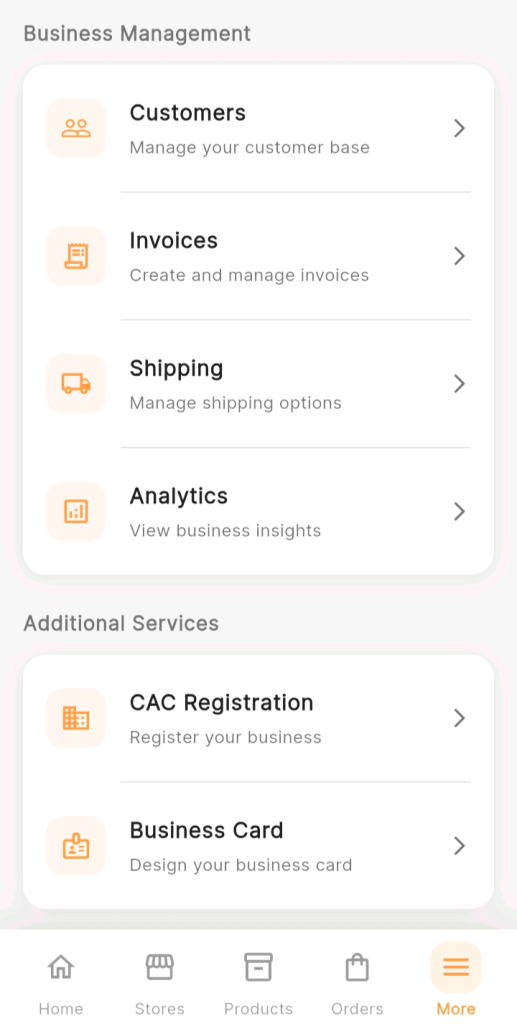
From the bottom navigation bar, tap “More.”
Under the “Business Management” section, tap “Customers” to open your customer management page.
You will see your full customer list displayed — all contacts saved in your KarryBiz database, either added manually or imported via CSV.
Step 3: Find the Customer Whose History You Want to View
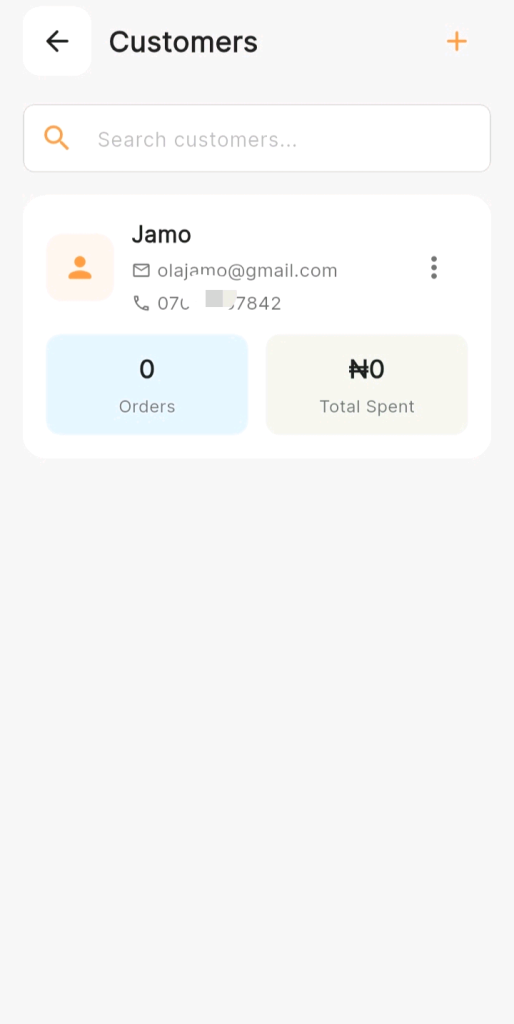
On the Customers page, locate the specific customer you want to review.
Finding a customer quickly:Scroll through your customer list if it is shortUse the Search bar at the top of the page — type the customer’s name, phone number, or email to find them instantly.
Filter by recent activity or purchase frequency if these options are available
Step 4: Tap on the Customer’s Name to Open Their Profile
Once you have located the customer, tap on their name or profile card to open their Customer Profile Page.
This is the central hub for everything KarryBiz knows about this specific customer — their contact details, their address, any notes you have added, and most importantly, their complete purchase history.
Step 5: Navigate To The Purchase History Section
Inside the Customer Profile Page, scroll down until you reach the Purchase History or Order History section.
This section displays a chronological list of every order or invoice linked to this customer — from their most recent transaction down to their very first.
Each entry in the purchase history typically shows:
• Order or Invoice Number: Unique reference for the transaction.
• Date: When the order was placed or invoice was created.
• Items: Products included in the order.
• Total Amount: The value of the transaction.
• Status: Current status of the order or payment.
Step 6: Tap on an Individual Order to View Full Details
To see the complete details of any specific transaction in the purchase history, tap on that order or invoice entry.
This opens the Order Detail Page or Invoice Detail Page — showing you the full breakdown of that specific transaction.
Step 7: Review the Customer’s Overall Purchase Summary
Review the customer’s overall purchase summary and retrieve actionable data you can use to drive sales or engage the customer.
Conclusion
Your customers are not just names and phone numbers in a database. They are real people with real preferences, real purchasing patterns, and a real history with your business.
Their purchase history on KarryBiz is the story of your relationship with them — told in orders, invoices, products, and payments. The more you read that story, the better you understand who they are and how to serve them.
And the better you serve them — the more they buy, the more they refer, and the longer they stay.
Tap into your customer profiles this week. Review the purchase history of your top five buyers. Find one pattern you can act on. Send one personalized message.
That is how loyal customers are built — one thoughtful interaction at a time.