How To Add Your Store Logo On KarryBiz

When customers visit your online store, the first thing they notice isn’t your products but your branding. Your logo is the first visual elements that instantly communicate who you are, what you sell, and how professional your business is.
On KarryBiz, adding your store logo is one of the simplest ways to transform your store from a basic setup into a trusted and recognizable brand. These elements help you stand out, build credibility, and create a memorable shopping experience for your customers.
In this guide, you will learn how to add your store logo on KarryBiz, along with best practices to make your store look clean, attractive, and professional.
Why Your Logo Are Non-Negotiable
Before we get into the how, let us talk about why this element and how it matters so much.
•Your Logo:
Your logo is your brand’s identity compressed into a single image. It is the first thing customers notice and the last thing they remember. A great logo:
• Makes your store instantly recognizable.
• Communicates professionalism and legitimacy.
• Builds brand recall — customers remember you the next time they shop.
• Appears on your invoices, receipts, and anywhere your store is represented.
How To Add Your Store Logo
Step 1: Log In and Go to Your Store Settings
• Open the KarryBiz app or visit karrybiz.com on your browser and log in.
• From the bottom navigation bar, tap “Stores.”
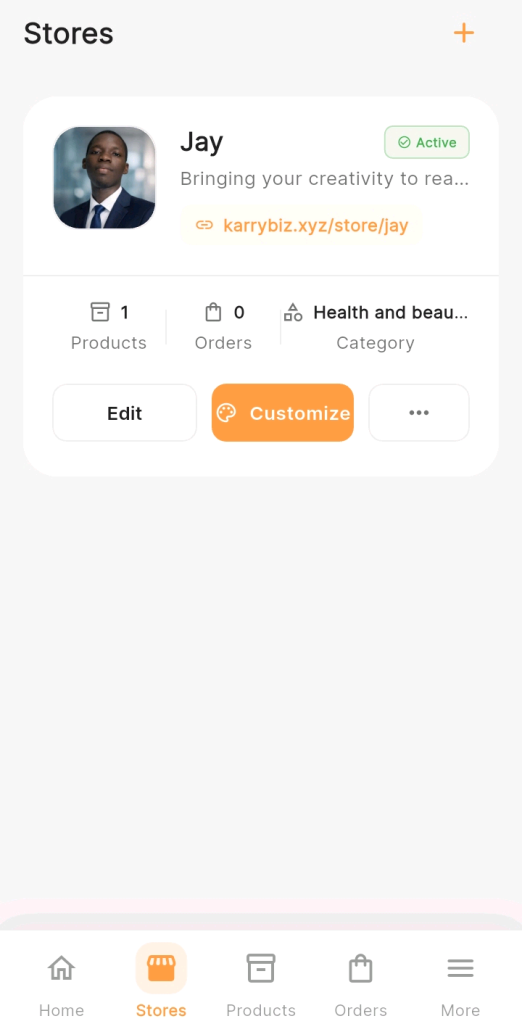
• Select the store you want to update and tap “Edit Store” to open your store settings.
Step 2: Find the Logo Upload Section
Inside your store settings, look for:
• “Store Logo” or a circular/square placeholder image with a camera or upload icon.
• Tap on it to open the image upload option.
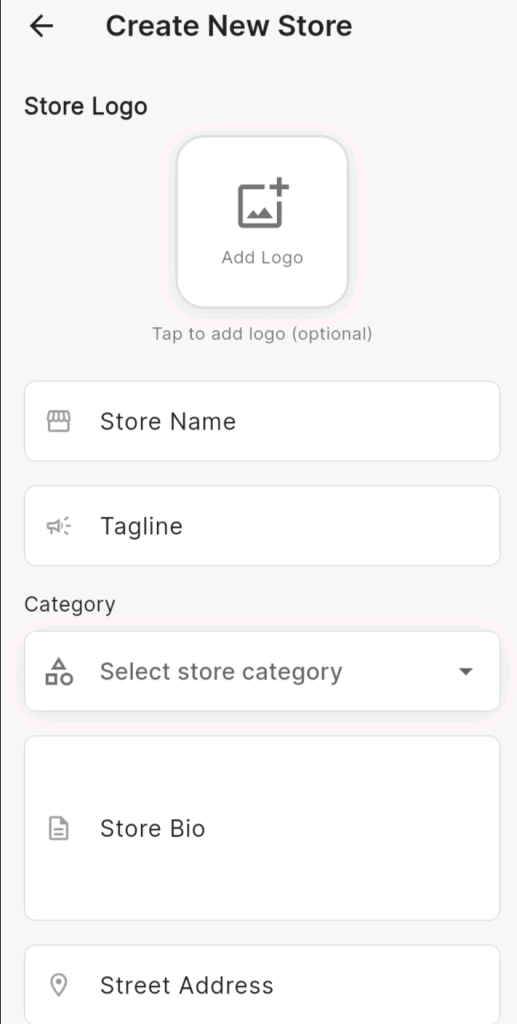
Step 3: Upload Your Logo
You will be prompted to either:
• Choose from Gallery — Select an existing logo from your phone.
• Take a Photo — Not recommended for logos; use a pre-made file instead.
• Select your logo file from your gallery and upload it.
PS: Your logo is now live on your storefront.
What Makes a Great Store Logo:
• Simple and clean because complex logos shrink badly on mobile screens.
• Readable at small sizes: Your logo will appear small in some views; make sure text is still legible.
• On-brand colors: Your logo colors should match your overall store theme.
• No blurry edges: Always use a high-resolution file.
What to Avoid:
• Screenshots of logos (always blurry).
• Logos with white backgrounds on dark-themed stores.
• Text-only logos in overly decorative fonts that are hard to read.
• Logos that are too wide or too tall, they will get cropped awkwardly.
Conclusion
Your logo is more than just a design element, rather it is a powerful tool that shape how customers perceive your business.
With KarryBiz, adding and updating these elements is quick and easy. By uploading a clean logo that is well designed, you can instantly improve your store’s appearance, build trust, and create a better shopping experience.
Take a few minutes to set up your branding properly—it is a small step that can make a big difference in how customers engage with your store.