How To Set A Custom Domain For Your Store On KarryBiz

Building an online store is an important step toward growing your business, but creating a strong and professional brand presence goes beyond simply listing your products online. One of the most effective ways to make your store look credible and trustworthy is by using a custom domain name.
I want you to imagine two different scenarios as presented below. Imagine two online stores selling the exact same product at the same price.
• Store A looks like this: https://karrybiz.xyz/store/jay.
• While store B looks like this: www.jayphotography.com/store.
Which one would you trust more?Most customers would pick the second one (store B) — without even thinking about it. That is the power of a custom domain.
A custom domain is a personalized web address that carries your business name. It replaces the default link KarryBiz assigns to your store with something that looks professional, branded, and credible.
The good news? Setting it up on KarryBiz is straightforward — and you don’t need a web developer to do it.
This guide walks you through everything, step by step.
Why Your KarryBiz Store Needs a Custom Domain
Using a custom domain provides several advantages for your online business.
1. Builds Trust With Customers:
Customers are more likely to trust and buy from a store that has a professional domain name. A custom domain signals that your business is legitimate and established.
2. Strengthens Your Brand:
Your domain name becomes part of your brand identity. When customers see your store link on social media, marketing materials, or business cards, it reinforces your brand recognition.
3. Makes Your Store Easier to Remember:
A short and simple domain name is easier for customers to remember and share with others.
4. Improves Online Visibility AKA SEO (Search Engine Optimization) Ranking:
Custom domains are better for search engine visibility. If you plan to grow your business through online searches, having your own domain helps search engines identify and index your store properly.
What You Will Need Before You Start?
To connect a custom domain to your KarryBiz store, you will need:
• An active KarryBiz account with a store already created.
• A custom domain name (e.g. www.yourbusinessname.com).
• Access to your domain registrar’s DNS settings.
PS: If you don’t have a domain yet you don’t have to worry, you can easily purchase one through your KarryBiz store’s dashboard.
When choosing a domain name, try to keep it:
• Short and easy to remember.
• Relevant to your business name.
• Easy to spell.
• Free of unnecessary symbols or numbers:
For example, if your business name is FreshFarm Market, a domain like freshfarmmarket.com would be ideal.
Step-by-step Process To Add A Custom Domain
Step 1: Log In to Your KarryBiz Account
• Open the KarryBiz app on your browser and log in to your account.
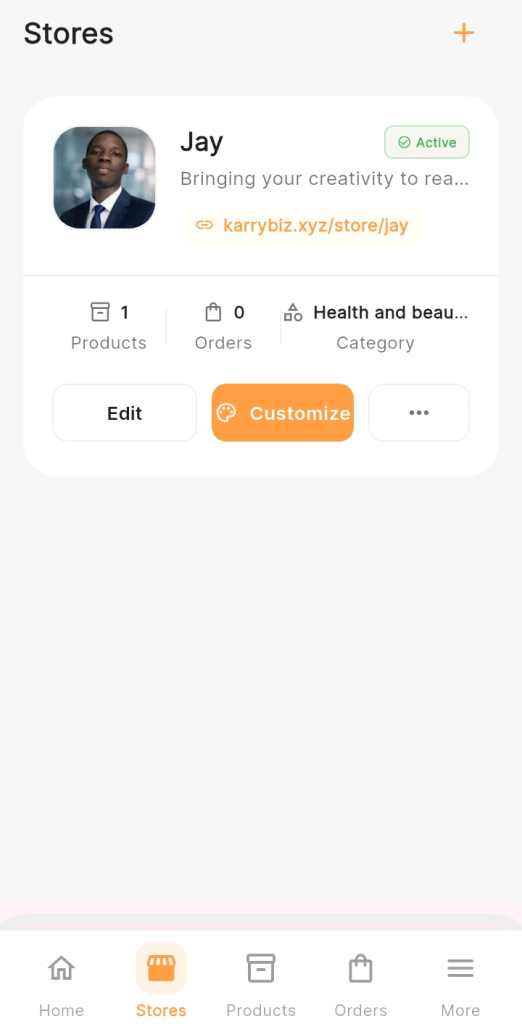
• From the bottom navigation bar, tap “Stores” to go to your store management page.
Step 2: Open Your Store Settings
• On the Stores page, select the store you want to connect a custom domain to.
• Tap on “Settings” or the edit/manage option for that store. This will open your store’s configuration panel where you can manage various store details.
Step 3: Navigate to the Custom Domain Section
Inside your store settings, look for a section labeled:
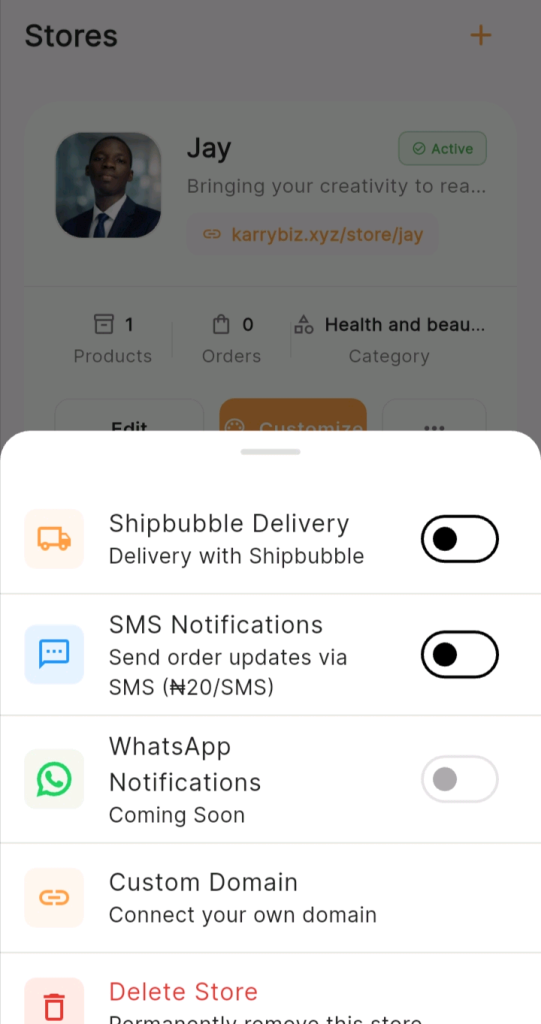
• Click on the three horizontal dots.
• Select “Domain Settings” from the list of add-on services.
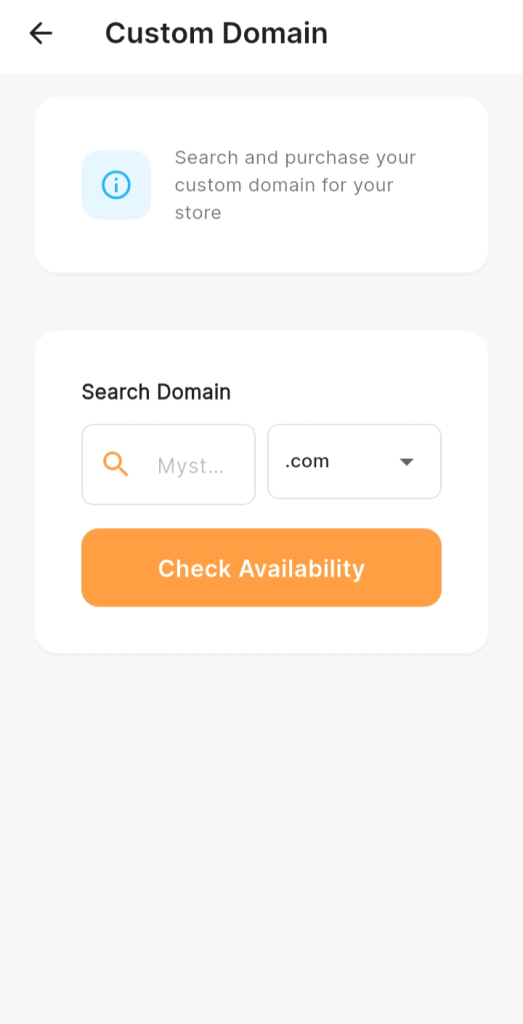
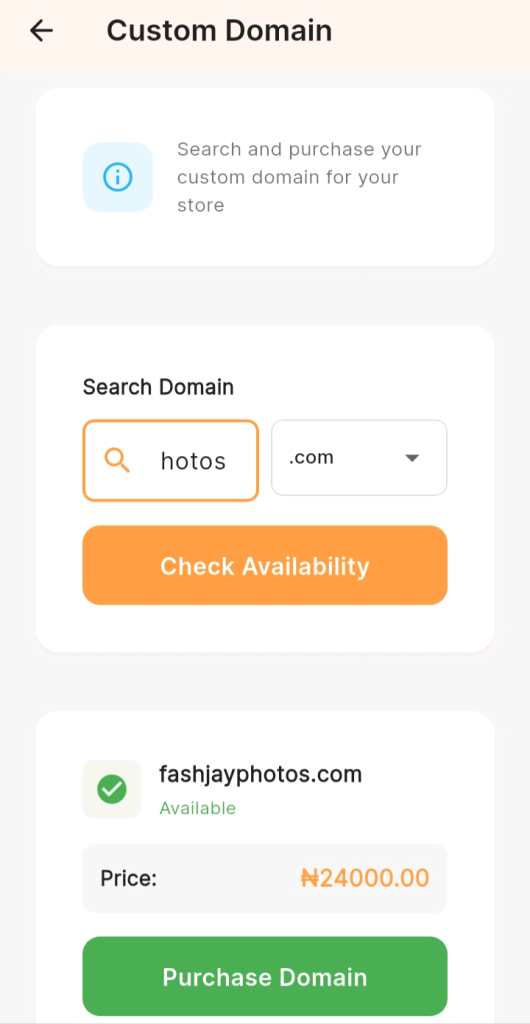
• Search for available domain. Ensure that the name is easy to remember and avoid including numbers or symbols for easy recall.
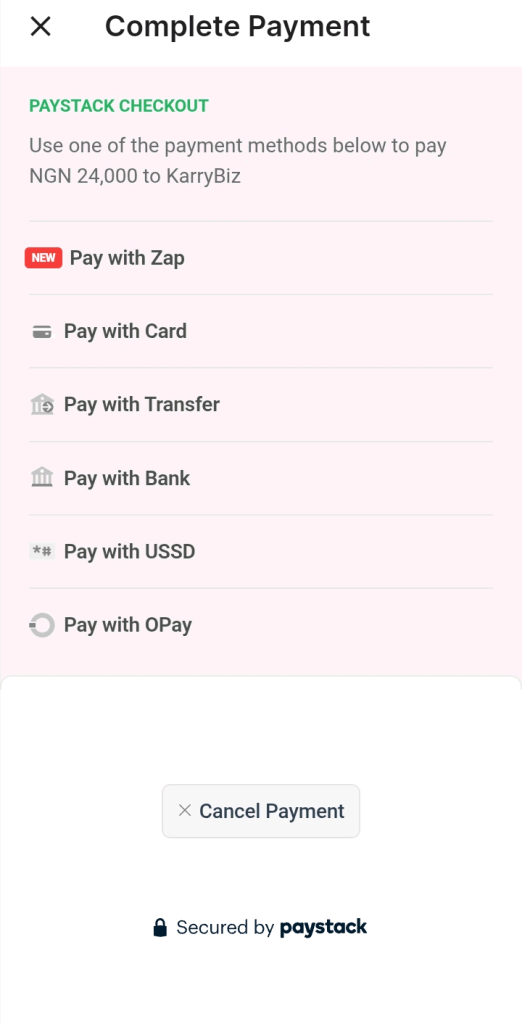
• You can pay via any convenient methods including by ATM cards or transfer.
• Tap on it to open the domain connection page.
Step 4: Enter Your Custom Domain
In the field provided, type in your custom domain name exactly as it appears. For example: www.fashionbyjemimah.com.
Note: Ensure to type correctly into the custom field, as any typos will result in error in the connection.
• Tap “Save” or “Connect Domain” after entering it. KarryBiz will now display a set of DNS records you need to add to your domain registrar.
These are usually: a CNAME record Or A recordCopy these details, as you will need them in the next step.
Step 5: Update Your DNS Settings on Your Domain Registrar
This is the most technical part of the process, but do not worry — it is simpler than it sounds.Log in to your domain registrar account (e.g. Namecheap, GoDaddy, Whogohost, harmonweb etc) and navigate to:
• Domain Management → DNS Settings → Manage DNS Records.
• Add the records KarryBiz provided.
• Add the records KarryBiz provided and hit save
Step 6: Wait for DNS Propagation
Once you save your DNS records, the changes don’t take effect instantly. This process is called DNS propagation and it typically takes anywhere from 15 minutes to 48 hours depending on your domain registrar. During this time:
• Your custom domain may not work immediately — that is normal.
• You can use a tool like dnschecker.org to monitor when your domain goes live.
• Your KarryBiz store will still be accessible via its default link in the meantime.
Note: Once propagation is complete, visiting your custom domain will load your KarryBiz store automatically.
Step 7: Verify the Connection on KarryBiz
Go back to your KarryBiz store settings and revisit the Custom Domain section.
KarryBiz will show a status indicator, look for:
• “Domain Connected” or “Active” — You are good to go!
Or
• “Pending” or “Not Verified” — DNS propagation is still in progress. Wait a few more hours and check again.
Note: Once verified, your store is now live on your custom domain.
Step 8: Test Your Custom Domain
Open a browser and type in your custom domain. Your KarryBiz storefront should load perfectly.
Test it on:
• Your smartphone browser.
• A desktop browser.
• An incognito/private window.
• Share the link with a friend or family member to confirm if they can access it too.
Best Practices for Choosing a Good Domain Name
Choosing the right domain name can impact your brand success. Keep these tips in mind:
• Keep it simple: Short domain names are easier to type and remember — preferably around 15 characters long.
• Avoid complicated spelling: If customers struggle to spell your domain, they may not find your store.
• Match your brand name: Your domain should ideally reflect your business name.
• Use common extensions: Extensions like .com or .com.ng are widely trusted by customers.
Final Thoughts
Setting up a custom domain is one of the most important steps in making your KarryBiz store look professional and credible. A branded domain not only improves your store’s appearance but also helps customers remember your business and trust your brand.
The process is simple: purchase a domain, connect it through your KarryBiz dashboard, update your DNS settings, and verify the connection.
Once your custom domain is active, your store will have a unique and professional web address that represents your brand online.
As your business grows, this small step can make a big difference in how customers perceive and interact with your store.