How To Send An Invoice Directly To A Customer On KarryBiz

You have created the invoice. The details are perfect: customer name, products, quantities, price, due date, your bank account details in the notes. It looks professional. It is accurate and ready. Now what?
An invoice sitting in your KarryBiz dashboard that your customer hasn’t seen yet is just a document. It doesn’t get you paid. It doesn’t set expectations. It doesn’t give your customer the clarity they need to transfer money confidently.
Sending the invoice — getting it from your dashboard into your customer’s hands — is where the real work happens. And in Nigerian e-commerce, how you send an invoice matters almost as much as the invoice itself.
A customer who receives a proper invoice via WhatsApp, sees their name, the products they ordered, the exact amount, your bank details, and a clear due date — that customer pays faster, asks fewer questions, and feels more confident about the transaction than one who gets a quick voice note saying “please send to my account.”
The difference is professionalism, and professionalism gets you paid.
KarryBiz gives you multiple ways to send invoices directly to customers — each suited to different situations and customer preferences.
In this guide, we will walk you through every method available, when to use each one, and how to follow up professionally when payment doesn’t come through immediately.
Why the Way You Send Invoices Matters
Before we get into the steps, let us talk about why this deserves more thought than just tapping “share” and moving on.
• It Affects Payment Speed:
Customers pay faster when invoices are easy to access and understand. An invoice that arrives via their preferred channel — with all the information they need clearly laid out — removes every friction point between receiving the invoice and making payment.
A customer who has to ask “what is your account number again?” or “how much was the total?” has already slowed down the payment process. A well-sent invoice answers all of those questions before they are asked.
• It Affects Your Professional Perception:
In Nigeria, the majority of small business sellers collect payment through casual WhatsApp messages, such as “please send the money to this account.” When you send a properly formatted invoice via WhatsApp, it immediately signals that you operate differently. More formally. More seriously. And overall more professionally.
That perception matters in business. It builds confidence in first-time buyers and reinforces trust with returning customers.
• It Creates a Paper Trail:
A sent invoice is documentation that a transaction was agreed and payment was requested. If a customer ever disputes what was ordered, what was charged, or whether they received a request for payment — the invoice is your record.
Send it via a channel that creates a timestamp. WhatsApp shows when a message was sent and read. Email has delivery and open records. That documentation protects you.
• It Sets Clear Payment Expectations:
An invoice with a due date is a payment deadline and payment deadline creates urgency. Urgency generates action. Customers who receive an invoice with “due: [date]” are more likely to pay on time than customers who received a casual payment request with no specified deadline.
Best Practices for Invoice Delivery
The sooner an invoice arrives after an order is placed, the faster payment comes in. A customer who receives an invoice immediately — while the purchase is still fresh and exciting — is in the best psychological state to pay quickly.
Delaying an invoice by two or three days allows enthusiasm to cool, urgency to fade, and other priorities to take over.
• Match the Channel to the Customer: Most Nigerian buyers prefer WhatsApp. But some corporate clients need email. Some international customers prefer links. Pay attention to how each customer communicates with you and use their preferred channel.
A customer who always messages you on WhatsApp but receives an invoice via email may miss it entirely. Channel match is a small thing that makes a real difference.
• Always Include Payment Details in the Invoice:
This should go without saying — but it is worth repeating because it is still so commonly missed.
• Your bank details: bank name, account name, and account number — should be in the Notes section of every invoice, every time. Do not make customers ask for your account number separately. Every additional step between invoice and payment is an opportunity for the transaction to stall.
Keep Records of When Invoices Were Sent
Maintain a simple log — either in a notebook or a spreadsheet of:
• Invoice number.
• Customer name.
• Amount.
• Date sent.
• Channel used.
• Payment status.
• Date paid.
This log becomes your accounts receivable tracker — showing you at a glance what is been paid, what is outstanding, and what is overdue.
How To Access Your Invoices on KarryBiz
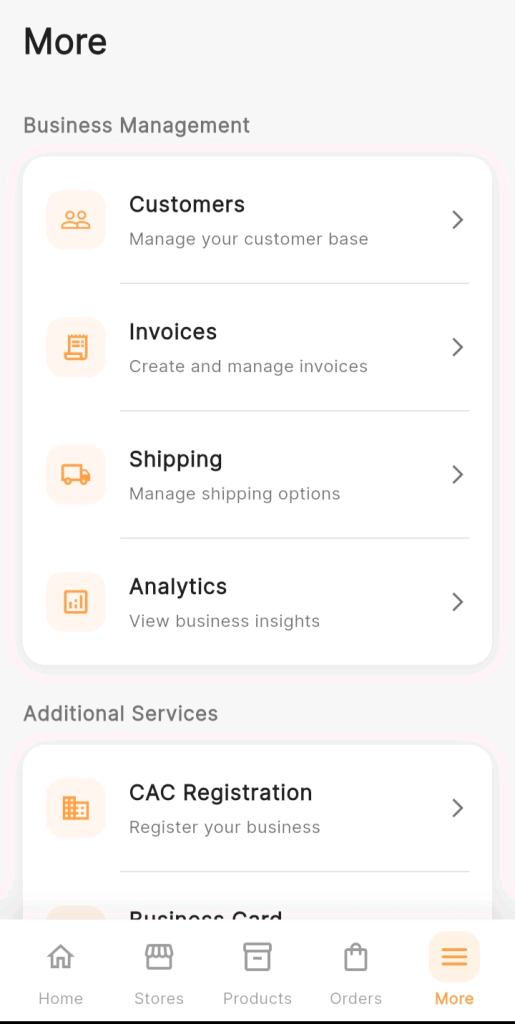
From the bottom navigation bar, tap “More.”
Under Business Management, tap “Invoices” — Create and manage invoices.
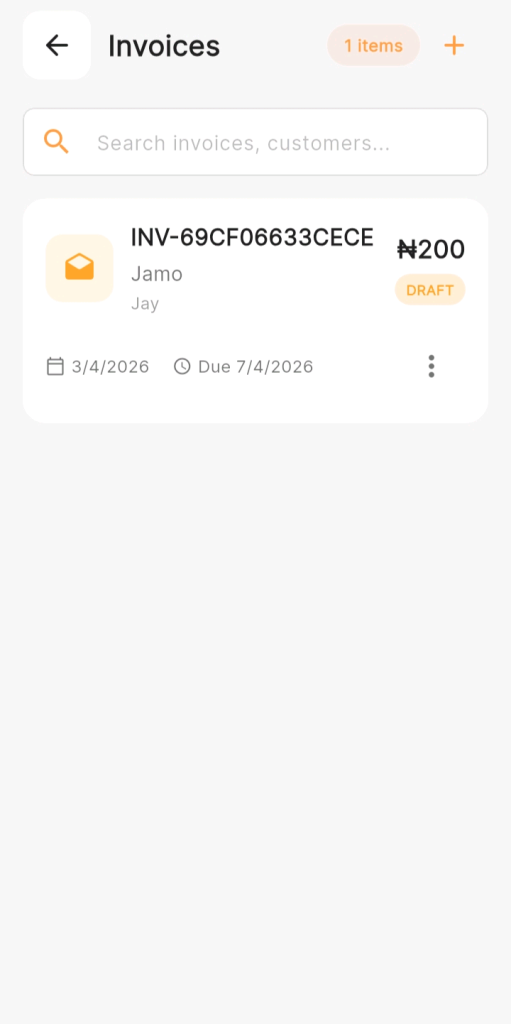
Your Invoices dashboard opens — showing all invoices you have created, organized by status: Draft, Sent, Paid, Overdue, and Cancelled.
Step 1: Make Sure Your Invoice Is Complete Before Sending
Before you send any invoice, confirm that it is complete and accurate. A customer who receives an invoice with wrong details: incorrect pricing, missing items, wrong account number — has to come back to you to clarify. That delays payment and creates unnecessary friction.
Step 2: Open the Specific Invoice You Want to Send
On your Invoices dashboard, find the invoice you want to send.
Tap on it to open the Invoice Detail Page — showing the complete invoice exactly as the customer will see it.
Review it one final time. Read through every line. Confirm the bank account details in the notes are correct — this is the single most important thing to verify before sending.
Step 3: Choose How to Send the Invoice
KarryBiz gives you multiple options for sending your invoice to a customer. Each method has its own strengths — and the right choice depends on your customer’s preferences and the nature of the transaction.
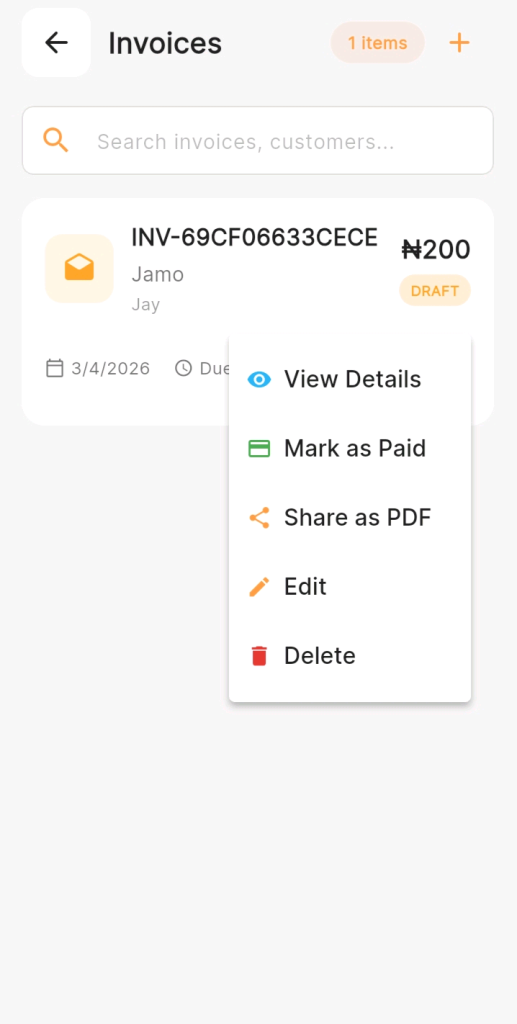
Tap the three vertical dots to either:
• View details.
• Change the status from drafts or current status to the most recent status.
• Share as PDF to share via your customer’s favourite channel.
• Edit for any further corrections.
• Delete (as the case may prompt).
Method 1: Send Via WhatsApp — The Most Effective Channel for Nigerian Sellers
WhatsApp is where Nigerian buyers live. It is the communication channel they check most frequently, respond to fastest, and feel most comfortable with for business transactions.
Sending an invoice via WhatsApp combines the professionalism of a formal payment document with the immediacy and accessibility of the platform your customers already use all day.
Method 2: Send Via Email
Email works well for:
• Corporate customers or businesses who require formal documentation.
• Customers who prefer email for financial records.
• Transactions where a written paper trail is particularly important.
• Customers who are less active on WhatsApp.
Method 3: Download as PDF and Send Manually
KarryBiz allows you to download your invoice as a PDF file — which you can then send through any channel that supports file attachments.
Final Thoughts
Sending an invoice seems like a small administrative task. But done well — consistently, promptly, and through the right channels — it is one of the most powerful things you can do to get paid faster, build professional credibility, and create a customer experience that keeps people coming back.
Every invoice you send is a statement about how you run your business. It says: “I am organized. I am professional. I have documented what we agreed. And here is exactly how to pay me.”
That statement builds trust. Trust accelerates payment. And payment — prompt, reliable, well-documented payment — is what keeps your KarryBiz business healthy and growing.
Send every invoice. Send it well. And follow up without apology.