How To Manage Order on KarryBiz


Efficient order management is the backbone of any successful e-commerce business. It is not just about receiving orders, but processing them smoothly, tracking progress, and ensuring customers get exactly what they paid for on time.
Getting the order is only half the job. Managing it is the other half.
How you handle an order after it comes in determines everything. It determines whether the customer gets their product on time. Whether they feel informed and valued throughout the process. Whether they come back to buy again. Whether they recommend your store to their friends or warn them to stay away.
Poor order management leads to missed deliveries, confused customers, negative reviews, and refund requests. Good order management leads to five-star reviews, repeat customers, and a reputation that grows your business on autopilot.
KarryBiz gives you a powerful, easy-to-use order management system that keeps everything organized — from the moment an order comes in to the moment it lands at your customer’s door.
In this complete guide, we will walk you through everything you need to know about managing orders on KarryBiz — step by step, with pro tips and best practices built in.
Why Order Management Matters for Your Business
Before we dive into the how, let us establish exactly why this matters so much.
• It Keeps Your Business Organized:
Without a proper system, orders can slip through the cracks. A customer waits for a package that was never shipped because you forgot about the order. That is a refund request, a damaged reputation, and a lost customer — all from one mistake.
• It Keeps Customers Happy:
Customers don’t just want their products — they want to feel informed throughout the process. An order that is acknowledged, processed, and updated at every stage creates a customer experience that earns loyalty.
• It Helps You Spot Problems Early:
A good order management system lets you see at a glance which orders need action, which are on track, and which have issues. You can identify and resolve problems before they escalate.
• It Gives You Business Clarity:
Your order history is a goldmine of business intelligence. Which products sell most? Which days get the most orders? Which customers order most frequently? All of this lives in your order data.
• It Supports Business Growth:
As your store grows and order volumes increase, a structured management system is what keeps things from falling apart. Businesses that scale are businesses that have systems.

Step-by-Step: How to Manage Orders on KarryBiz
Step 1: Log In to Your KarryBiz Account
Open the KarryBiz app on your smartphone or visit karrybiz.com on your browser.
Enter your login credentials and tap “Sign In” to access your dashboard.
Step 2: Navigate to the Orders Section
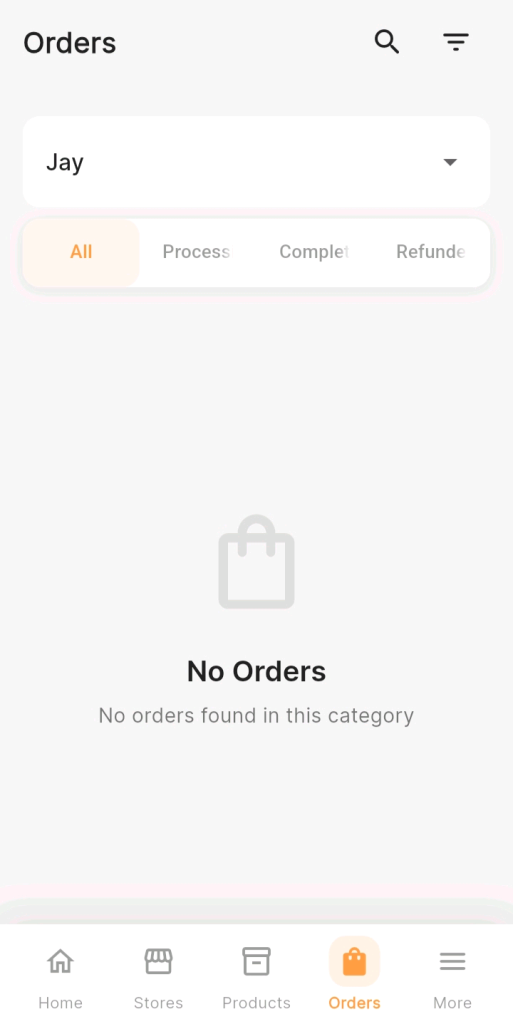
From the bottom navigation bar, tap “Orders.” This opens your order management dashboard where all customer orders are displayed.
Step 3: View and Review Incoming Orders
On the Orders page, you will see a list of all orders your store has received.
New orders will typically appear at the top and may be highlighted or tagged as “New” or “Pending” to draw your attention.
Tap on any order to open its Order Detail Page — this is where you will find everything about that specific order:
• Order number : Unique identifier for the order.
• Order date and time: When the order was placed.
• Customer details: Name, phone number, email, and delivery address.
• Items ordered: Product names, quantities, and sizes or variants selected.
• Order total: Subtotal, delivery fee, discounts, and final amount.
• Payment status: Whether payment has been made or is pending.
• Current order status: Where the order currently stands in the fulfillment process.
Step 4: Confirm the Order
• Once you have reviewed the order details and confirmed that everything is in order: stock is available, payment is confirmed, delivery address is complete. It is now time to proceed to confirm the order.
• Tap “Confirm Order” or change the order status from “Pending” to “Confirmed.”
• At this point, it is best practice to notify your customer immediately.
Step 5: Process and Prepare the Order
Now the physical work begins, such as getting the product ready for delivery.
Depending on what you sell, this step involves:
• Picking the item from your inventory.
• Checking the item for quality — ensure it matches what was ordered exactly.
• Packaging the item securely to prevent damage during transit.
• Labeling the package with the customer’s name and delivery address.
• Arranging shipment with your delivery partner or logistics service.
Step 6: Ship the Order
• Once the order is packaged and ready, hand it over to your delivery partner.
• Configure the “Shipbubble delivery options” from your store by clicking on the three horizontal dots.
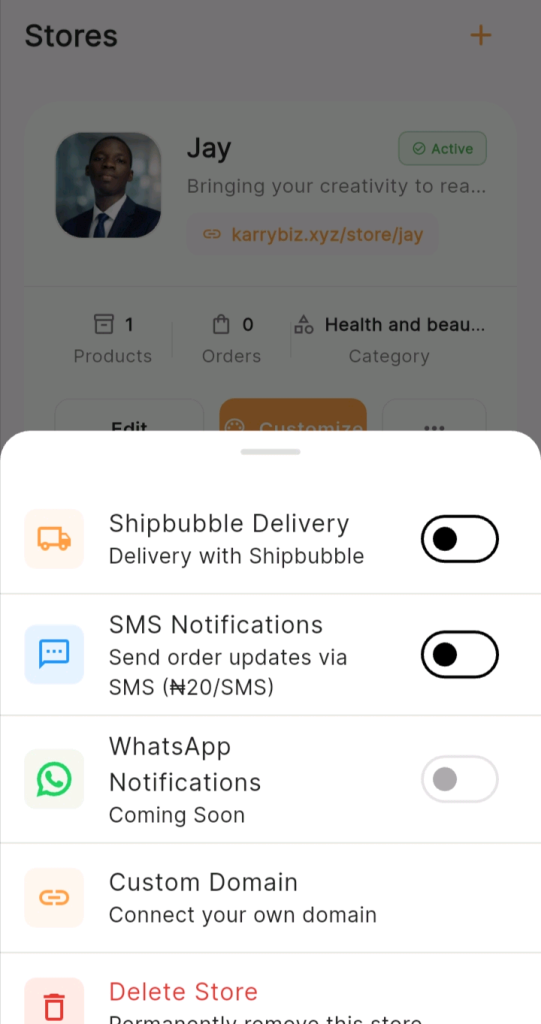
• Enter all shipping details under the “business management section.
Step 7: Confirm Delivery
Once your delivery partner confirms that the order has been delivered — or your customer messages you to confirm receipt — update the order status to “Delivered.”
This is also the perfect moment to:
• Thank your customer for their purchase
.• Ask for feedback or a review.
• Suggest related products they might enjoy.
• Offer a loyalty discount for their next order.
Step 8: Handle Cancellations Professionally
Sometimes customers cancel orders. It happens — and how you handle it matters.
To cancel an order on KarryBiz:
• Open the specific order from your Orders dashboard.
• Tap “Cancel Order“.
• Select a cancellation reason from the dropdown menu.
• Tap “Confirm Cancellation“.
Update the order status to “Cancelled” If the customer has already paid:
• Initiate a refund immediately — do not delay.
• Notify the customer of the refund timeline.
• Update the order status to “Refunded” once the refund is processed.
Step 9: Filter and Search Orders Efficiently
As your business grows and your order volume increases, finding specific orders quickly becomes important.
KarryBiz gives you tools to filter and search your orders.
Final Thoughts
Order management is where your brand promise meets reality.Your store can have the most beautiful logo, the most compelling description, and the most competitive prices in your category — but if your order management is chaotic, your customers will not come back.
The businesses that grow fastest in African e-commerce are not necessarily the ones with the best products. They are the ones with the best systems. Systems for receiving orders. Systems for fulfilling them. Systems for communicating with customers at every step.
KarryBiz gives you the tools. This guide gives you the process. Now it is your turn to build the system — and watch your business grow with every order you manage, one at a time.